There’s a particular kind of chaos that sneaks into finance teams quietly.
Not dramatic chaos. Not the sort with alarms and flashing lights. I’m talking about the everyday, low-grade mess that builds when invoices land in five different inboxes, a manager forgets to approve one before heading out for a long weekend, and somebody in AP is left playing detective on a Tuesday afternoon, trying to figure out whether a bill was approved, denied, or simply vanished into the corporate void.
That, in a nutshell, is why the accounts payable approval process matters so much.
Because when it’s clunky, everything downstream gets sticky. Payments stall. Vendors get irritated. Early-payment discounts slip through your fingers. Duplicate invoices sneak past tired eyes. And the AP team? They spend more time chasing signatures, forwarding emails, and nudging approvers than doing the work that actually keeps cash flow steady and visible. It’s a grind. Frankly, a pretty avoidable one.
A lot of businesses still treat the AP approval process like it’s just a routine back-office step. Stamp it, send it, approve it, move on. But that’s not really how it plays out in real life. In real life, invoice workflow gaps create bottlenecks that ripple outward—into vendor relationships, reporting accuracy, month-end close, even audit prep. One small delay has a funny way of turning into three other problems by Friday.
And here’s the good news: fixing invoice approval procedures usually doesn’t require some massive, rip-and-replace overhaul. More often, it starts with tightening the workflow, removing the dumb friction, and making approvals easier for the people who have to give them.
That’s what this article gets into. What the accounts payable invoice approval process actually looks like, where it tends to go sideways, and how to make it faster, cleaner, and a lot less painful.
What is the accounts payable approval process?
The accounts payable approval process is the method a company uses to review an invoice, verify that it’s accurate and legitimate, and authorize it for payment.
Simple enough on paper. In real life, it sits inside a bigger invoice workflow, and that’s where things can get tangled.
Approval is not the whole process. It’s one stage in the broader accounts payable invoice approval process, which usually looks like this: an invoice is received, the data is captured, the details are validated, the expense is coded, the invoice is routed to the right person, approval is given, payment is scheduled, and the record is archived for audit and reference.
Here’s the flow in plain English:
An invoice comes in by email, PDF, mail, or supplier portal. The key information is captured. Then the invoice is checked for accuracy—vendor details, totals, PO match, department, whatever applies. After that, it’s coded to the right GL account or cost center and routed to the appropriate approver based on rules like amount, location, or department. Once approved, it moves to payment. Then it’s stored, along with the approval history and supporting documents.
That approval step matters more than people think. It’s the point where a business decides whether money should actually go out the door. If that step is slow or sloppy, the rest of the AP invoice approval process tends to wobble too—payments get delayed, visibility drops, and AP teams end up chasing answers instead of managing cash flow.
So while the phrase ap invoice approval process sounds narrow, it’s really connected to the entire lifecycle of an invoice. And when that workflow is built well, everything downstream gets easier.
How a typical manual invoice workflow works
A manual invoice workflow usually starts when an invoice arrives by email, mail, or PDF. Sounds simple. It rarely stays that way.
First, AP has to enter the invoice data manually into the accounting system. That means keying in vendor details, invoice number, amount, due date, and sometimes line items. It’s slow, and it opens the door to typos and duplicate entry.
Next, the team verifies PO or non-PO details. If there’s a purchase order, they match it. If there isn’t, they may need to track down department approval or supporting documents. This is often where the accounts payable approval process starts to bog down.
Then the invoice is routed to approvers. In a manual ap approval process, that may happen by email, paper copy, or a basic shared folder. If the wrong person gets it—or no one notices it—everything stalls.
After that, follow-ups happen through email or paper, with AP chasing responses and approvers digging through inboxes. Not exactly graceful.
Once approved, the invoice is posted and scheduled for payment. Finally, backup documents are stored for audit purposes, often across multiple folders or systems.
That’s the core problem with a manual accounts payable invoice approval process: every step has friction, and small delays pile up fast.
The biggest problems with manual invoice approval procedures
Manual invoice approval procedures don’t usually fail in one big, dramatic way. They fail by inches.
An invoice gets lost or misplaced. An approver is out of office. Someone rekeys the wrong amount or codes the expense to the wrong department. And just like that, the accounts payable approval process starts costing more than it should.
Slow approvals are a major issue. When invoices sit in inboxes or on desks, payments get pushed back, vendors get annoyed, and AP loses the chance to capture early-payment discounts. That’s real money slipping away for no good reason.
Manual coding creates another headache. Rekeying invoice data increases the odds of errors, duplicate payments, and reporting problems. Fixing those mistakes takes time, and time in AP is never exactly lying around.
Then there’s visibility—or the lack of it. In a manual ap invoice approval process, AP often can’t see where an invoice is, who has it, or why it’s delayed. So the team chases updates instead of managing payables. It’s inefficient, and honestly, frustrating for everyone involved.
The audit side isn’t much prettier. Weak documentation and scattered records create compliance risk, especially when approval history lives across email threads, paper files, and shared folders.
And over time, all of this creates tension between AP and department approvers. AP feels like it’s nagging. Approvers feel like they’re being chased. Nobody wins. The workflow just gets heavier, slower, and more expensive.
The 7 essential steps in an effective AP approval process
A solid accounts payable approval process isn’t fancy for the sake of being fancy. It just removes the usual snags—the bottlenecks, the guesswork, the “who has this invoice now?” nonsense—and turns the whole invoice workflow into something predictable.
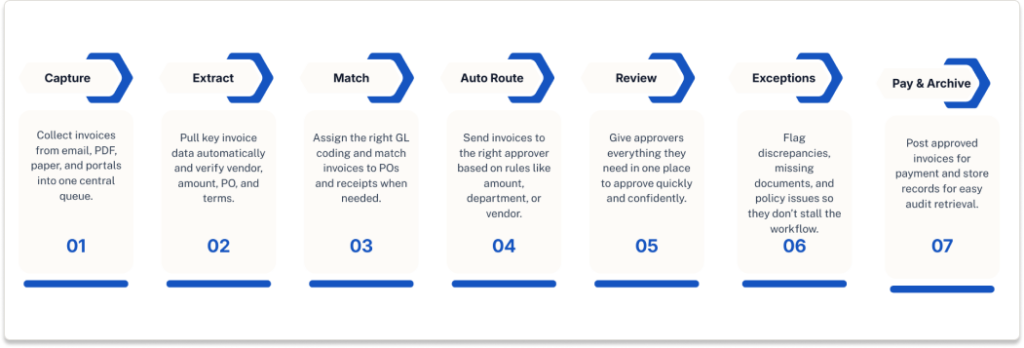
1. Invoice capture
Start by pulling invoices into one place. Email, PDF, paper, supplier portals—it all needs to land in a centralized queue. Otherwise, invoices drift around the business like loose socks in a dryer, and that’s when things get missed.
2. Data extraction and validation
Next, capture the key invoice data without forcing AP to type everything by hand. Vendor name, invoice number, amount, PO, payment terms. Then validate it. Is the supplier correct? Does the amount make sense? Are the terms right? This step trims manual entry and gives the ap invoice approval process a cleaner start.
3. Coding and matching
Once the data is in, the invoice needs to be coded correctly. That means assigning the right GL account, cost center, or department. If it’s a PO invoice, it should also be matched against the purchase order and, when needed, the receipt. No match, no mystery payment.
4. Rule-based routing
After that, the invoice should move automatically to the right approver based on rules—amount, department, location, vendor, whatever the business uses. This is where a smart ap approval process saves real time. No manual forwarding. No guessing. No “I thought Janet handled this.”
5. Approval review
Approvers need to review invoices quickly, with the full picture in front of them. That means the invoice, PO, receipt, coding, and backup documents should all be in one place. If people have to dig through email threads to figure out what they’re approving, the accounts payable invoice approval process will slow down. Every time.
6. Exception handling
Not every invoice behaves. Some have discrepancies. Some are missing a PO. Some break policy. An effective process routes those exceptions to the right people instead of letting them clog the normal stream. That matters more than people think.
7. Posting, payment, and archive
Once approved, the invoice should move into the ERP or accounting system for payment scheduling. Then the record—invoice, approval history, supporting documents—should be archived in a way that’s easy to retrieve later. Because sooner or later, someone will ask for it. They always do.
What slows down an accounts payable approval process?
Most AP delays aren’t caused by one giant breakdown. It’s usually a stack of smaller issues, and they add up fast.
Approval bottlenecks are a big one. When too many invoices depend on the same person, the accounts payable approval process slows to a crawl. Add in too many manual handoffs, and the invoice workflow starts feeling like a relay race with dropped batons.
Unclear approval thresholds cause trouble too. If no one knows who should approve what amount, invoices get forwarded, bounced back, or left sitting. Missing documents make it worse. No PO, no receipt, no backup—now AP has to go hunting.
Multiple invoice intake channels also create drag. When invoices come through email, paper, PDFs, and portals without a central system, visibility disappears. Then there’s the lack of reminders or escalations. In a manual ap approval process, an invoice can sit untouched simply because no one followed up at the right time.
And one more thing, which still gets overlooked: no mobile or remote approval access. If approvers have to be at a desk, approvals wait. Work doesn’t.
A quick gut-check:
- Are invoices sitting with approvers too long?
- Do teams argue about who owns approval?
- Are missing documents holding invoices back?
- Can AP see invoice status in real time?
- Can approvers review and approve remotely?
If the answer is “yes” to more than one, the ap invoice approval process probably has more friction than it should.
How automation improves the invoice workflow
This is where the story changes.
In a manual invoice workflow, AP spends too much time touching the same invoice over and over—entering data, forwarding emails, chasing approvals, filing documents, checking status. It’s slow, fiddly work. And it adds up.
Automation cuts those manual touches down sharply. Invoice data can be captured automatically, routed by rule, and pushed to the right approver without AP acting like the middleman every single time. The result is a faster accounts payable approval process with fewer stalls and less back-and-forth.
Visibility improves too. Instead of guessing where an invoice is, AP can see its status in real time—received, routed, approved, flagged, paid. That alone changes the tone of the ap approval process. Less chasing. Less confusion. Fewer “just checking on this again” emails.
Errors tend to drop as well. When data extraction, validation, coding, and routing are automated, there’s less rekeying, fewer missed steps, and fewer chances for invoices to go sideways. Compliance gets easier for the same reason: documents, approvals, and history are stored in one place, which improves audit readiness and reduces paper handling.
More to the point, automation helps connect the full process. Approval doesn’t sit off by itself. It links to payment automation and document management, so the accounts payable invoice approval process becomes faster, cleaner, and easier to control from start to finish.
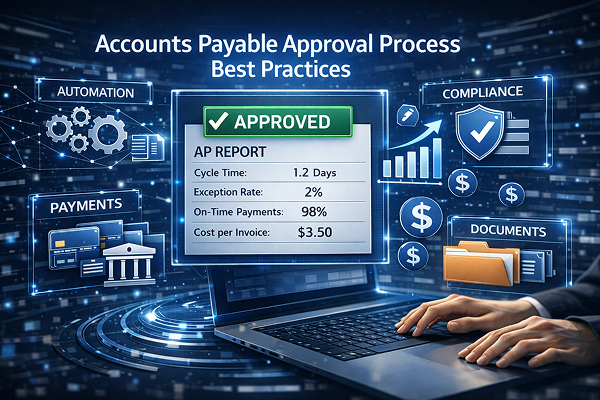
How to measure AP approval process performance
You can’t improve an accounts payable approval process if you’re not measuring where it slows down or what it costs.
Start with approval cycle time. This tells you how long it takes an invoice to move from receipt to final approval. If that number keeps stretching, the invoice workflow has a bottleneck somewhere.
Then look at average time per invoice. This shows how much effort the process really takes, not just how long invoices sit in queue. A high number usually points to too many manual touches.
Exception rate matters too. How many invoices need extra handling because of missing POs, mismatched data, policy issues, or coding problems? A rising exception rate usually means the ap approval process is working harder than it should.
Track on-time payment rate and missed discount rate together. One shows how often invoices are paid by the due date. The other shows how often delays cost you savings. Both have a direct financial impact.
Don’t ignore invoice status visibility, either. Can AP quickly see where an invoice is and who has it? If not, that’s a process problem, even if no one calls it that.
Finally, measure cost per invoice and audit retrieval time. Those numbers reveal whether the accounts payable invoice approval process is efficient day to day and whether records are easy to find when auditors come calling. Real improvement shows up in both speed and control.
Build an AP approval process that supports speed, control, and growth
At the end of the day, the best accounts payable approval process is not just about getting a signature and moving on. That’s too narrow. Too small.
A strong invoice workflow helps invoices move faster, yes—but it also reduces errors, strengthens control over spending, and makes the whole process easier to manage without constant chasing, guessing, or cleanup after the fact. That’s the real win.
When the accounts payable invoice approval process works the way it should, approvals happen faster, coding mistakes drop, audit trails get clearer, and vendors get paid on time. That last part matters. Vendors notice when your process is smooth, and they definitely notice when it isn’t.
So this really comes down to more than efficiency. It’s about building an ap approval process that can support growth without creating more administrative drag every time invoice volume increases. More control, less friction. That’s the balance most teams are after.
And for many organizations, the next logical step is invoice automation. Not because it sounds modern or shiny, but because manual approval procedures eventually hit a wall. Automation helps remove that wall—connecting approval, payment, and document management into one cleaner, faster system.