Most invoices aren’t “wrong,” exactly—they’re just… messy. A little vague here, missing a date there, totals that somehow don’t quite add up (we’ve all stared at a calculator thinking wait, that can’t be right). And then the real problem shows up a week later: payment delays, awkward follow-ups, that one client who suddenly “never received it.”
It’s funny, in a frustrating sort of way. You do the work. You deliver the service. And then everything hinges on this one document—an invoice—that most people throw together in five minutes between meetings or right before lunch. Not ideal.
I’ve seen it happen more times than I can count. A business grows, invoices pile up, someone’s manually typing details into spreadsheets or Word docs (why Word? no one knows), and suddenly what should be a simple billing process turns into a low-grade daily headache. Small errors creep in. Payments slow down. Cash flow gets… weird.
So yeah—writing an invoice matters more than people think. Maybe more than they’d like to admit.
In this guide, I’ll walk you through how to write an invoice properly—what it should look like, what to include (and what to avoid), and how to make sure it actually gets you paid without chasing people down like a polite-but-slightly-annoyed detective. And somewhere along the way, we’ll talk about why so many companies eventually stop doing this manually altogether.
Because honestly? There’s a better way.
What Is an Invoice and Why It Matters
Let’s not overcomplicate it.
An invoice is, at its core, a request for payment. That’s it. A formal nudge—sometimes polite, sometimes a bit urgent—saying: “Hey, here’s what I did (or delivered), here’s what you owe, and here’s when I’d really appreciate being paid.”
But—and this is where people underestimate it—it’s also a lot more than that.
So, what exactly is an invoice?
Technically speaking, it’s a document that outlines a transaction between a seller and a buyer. It includes details like what was sold, how much it costs, and when payment is due. Pretty standard stuff.
In practice? It’s your paper trail. Your proof. Your backup when someone inevitably says, “Wait, what is this charge for?”
When do you actually use one?
Depends on what you’re selling.
If you’re dealing with products, invoices usually come after goods are delivered—or sometimes alongside them. Think inventory, shipments, bulk orders. Straightforward.
Services are a different beast. A bit fuzzier.
With services, invoices might be:
- Based on hours worked
- Tied to project milestones
- Sent monthly (or whenever you remember… which, honestly, is part of the problem)
And here’s the tricky part: services require clarity. If your descriptions are vague—“consulting work,” “design support”—you’re practically inviting questions, delays, and those dreaded back-and-forth emails.
Why invoices matter more than people think
This is where things get real.
Cash flow
No invoice, no payment. Simple. But even a bad invoice can slow things down. Missing details, unclear totals, wrong dates—it all adds friction. And friction delays money.
Record-keeping
Every invoice becomes part of your financial history. Taxes, audits, internal reporting—it all traces back to these documents. Lose track here, and things get messy fast.
Legal documentation
In some cases, invoices aren’t just helpful—they’re evidence. If a dispute pops up (and occasionally, it will), your invoice helps establish what was agreed upon and what’s owed.
The part nobody talks about
Here’s the uncomfortable truth: most invoice problems don’t look like big problems at first.
They’re small. Subtle. Easy to ignore.
A missing PO number.
An unclear line item.
A due date that isn’t really a due date.
And then suddenly:
- Payments are late
- Finance teams are asking questions
- You’re chasing someone for money that should’ve already landed
Poor invoices don’t just slow payments—they create a ripple effect. Accounting headaches. Frustration. Lost time.
It’s not dramatic. It’s just… annoying. Consistently.
And that’s exactly why getting this right matters.
What Does an Invoice Look Like? (Visual Breakdown)
If you’ve ever Googled “what does an invoice look like”—and let’s be honest, most people have at some point—you’ve probably seen a dozen slightly different versions. Some clean and professional. Others… well, less so.
Here’s the thing: there’s no single “perfect” layout. No sacred template handed down from the accounting gods. But there is a structure that works—and when you stick to it, everything flows smoother. Fewer questions. Faster approvals. Less back-and-forth.
Think of an invoice like a receipt’s more organized, slightly more serious cousin. It should be easy to scan, easy to understand, and—this is important—impossible to misinterpret.
Key Elements of an Invoice
Alright, let’s break it down. Piece by piece.
Business name and contact info
Right at the top. Your company name, address, email, maybe a phone number if you’re feeling generous. This tells the recipient who the invoice is from—seems obvious, but you’d be surprised how often this is incomplete.
Customer details
Who are you billing? Include their company name, contact person, and address. If it’s going to a finance department (and it usually is), accuracy here matters more than you think.
Invoice number
A unique identifier. Not “Invoice 1” every time. Please.
This helps both you and your customer track payments, reference past transactions, and avoid confusion later.
Invoice date & due date
When was it issued? When is payment expected?
And no, “ASAP” is not a due date—tempting though it may be.
Itemized list (products or services)
This is where things can get messy if you’re not careful. Each product or service should be clearly described, with quantities, rates, and totals. The more specific, the better.
Total amount due
The number everyone’s looking for. Subtotals, taxes, discounts—whatever applies—should roll up cleanly into one final figure.
Payment terms
How should they pay you? Bank transfer, card, check?
Also include terms like “Net 30” or “Due upon receipt.” This sets expectations and avoids those awkward “just checking on this…” emails later.
A quick (very simple) invoice example
Not fancy. Not pretty. But it works.
Invoice #: 1024
Date: March 10, 2026
Due Date: April 9, 2026

From:
Brightline Design Co.
[email protected]

Bill To:
Acme Manufacturing Ltd.

Description              Qty     Rate     Total
Website Design           1       $2,000   $2,000
Monthly Maintenance      1       $300     $300

Subtotal:                         $2,300
Tax (10%):                        $230
Total Due:                        $2,530

Payment Terms: Net 30
Payment Method: Bank Transfer
Now, could this be styled better? Absolutely. Logos, colors, formatting—all of that helps. But structure comes first.
Because when an invoice is clear—really clear—something interesting happens. People don’t question it. They don’t delay. They just… pay it.
And honestly, that’s the whole point.
How to Write an Invoice (Step-by-Step)
Alright—this is where things get practical.
Because knowing what an invoice looks like is one thing… actually sitting down and writing one (especially when you’ve got five other things going on) is another. It’s easy to rush it. Skip a detail. Tell yourself, eh, it’s fine.
And sometimes it is fine. Until it’s not.
So here’s a straightforward, no-nonsense walkthrough of how to write an invoice—the kind that doesn’t come back with questions or, worse, silence.
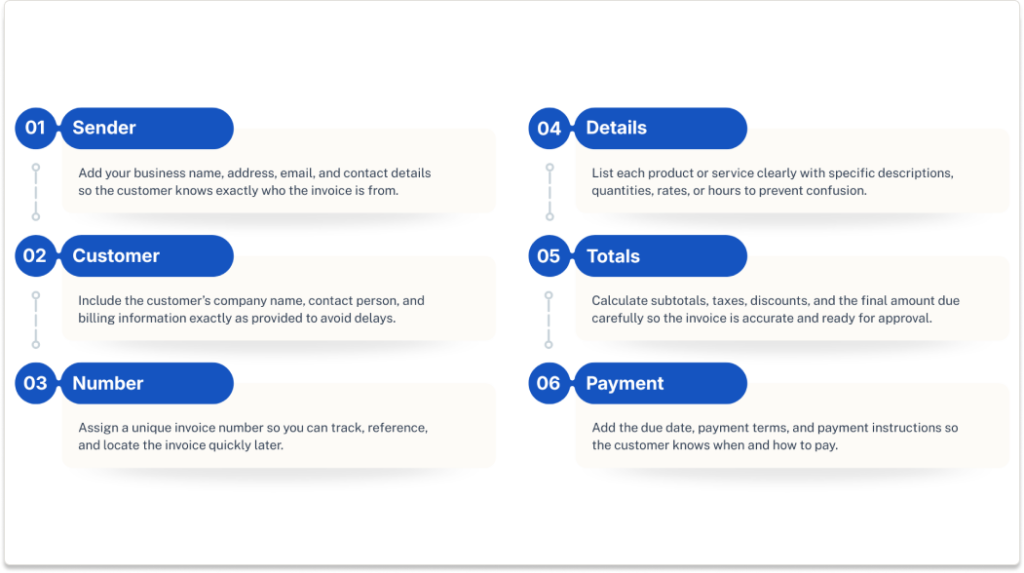
Step 1: Add Your Business Information
Start with you.
Your business name, address, email—basic stuff, but it sets the tone. If this section looks incomplete or sloppy, it kind of sends a signal (maybe unintentionally) that the rest of the invoice might be the same.
Also, quick aside—make sure the email you include is actually monitored. Sounds obvious, but… you’d be surprised.
Step 2: Include Customer Details
Now flip it around. Who’s receiving this?
Add your customer’s company name, contact person, and billing address. If they’ve given you specific billing instructions—like “send all invoices to [email protected]”—follow them exactly. No improvising here.
This is one of those small things that can quietly delay payment if it’s wrong. Or missing. Or sent to the wrong person entirely.
Step 3: Assign an Invoice Number
This is your tracking anchor.
Every invoice should have a unique number. Not random, not repeated, not “Invoice #7” three months in a row. Create a system—sequential, date-based, whatever works—and stick to it.
Because later on, when someone says, “Can you resend that invoice from February?” you’ll want to find it in seconds, not scroll through a dozen vaguely named files.
Step 4: List Products or Services Clearly
This is where clarity really matters.
Each item—whether it’s a product or a service—should be spelled out in plain language. Not overly technical. Not vague. Just clear.
Bad example:
“Consulting services – $2,000”
Better:
“Marketing strategy consultation (10 hours @ $200/hour) – $2,000”
See the difference? One invites questions. The other doesn’t.
And questions, as you might guess, slow things down.
Step 5: Calculate Totals and Taxes
Now the numbers.
Add up your line items, apply any taxes, include discounts if applicable, and present a clean total. Double-check this part—actually, triple-check it.
Because incorrect totals? That’s one of the fastest ways to delay payment. Finance teams won’t process something that doesn’t add up. They’ll send it back. Or worse, just leave it sitting there.
And then you’re stuck waiting, wondering why nothing’s happening.
Step 6: Add Payment Terms and Instructions
Finally—tell them how to pay you.
Spell it out. Payment methods, bank details, due date, terms like “Net 30” or “Due upon receipt.” Don’t assume they’ll figure it out.
If anything, assume the opposite.
A clear invoice doesn’t just say what’s owed—it explains how to settle it. No guesswork.
A few common mistakes (that cause way more trouble than they should)
These are small. But they add up.
- Missing due date
If there’s no deadline, payment tends to drift. People prioritize what’s urgent. - Unclear descriptions
Vague line items = questions = delays. It’s a chain reaction. - Incorrect totals
Even a small mismatch can hold everything up. Finance teams don’t like ambiguity. At all.
Writing an invoice isn’t complicated. Not really.
But doing it consistently well—that’s where most businesses trip up. And usually, it’s not because they don’t know what to include… it’s because they’re doing it manually, quickly, and over and over again.
Which, over time, tends to catch up with you.
How to Write an Invoice for Services
Service invoices are… different. Not wildly different, but just enough to trip people up.
With products, it’s usually clear-cut: item, quantity, price. Done. Easy.
Services? A bit more slippery.
You’re often billing for time, expertise, or some combination of both—things that don’t always translate neatly into a single line item. And that’s where problems tend to sneak in.
What makes service invoices different?
For one, time-based billing is common.
Instead of “3 units at $50 each,” you’re dealing with:
- Hours worked
- Days spent
- Ongoing retainers
And suddenly, the invoice has to explain the work, not just list it.
Then there’s the question of hourly vs fixed pricing.
- Hourly billing? You need to show time and rate. Transparently.
- Fixed pricing? You still need to justify the value—what exactly was delivered?
And here’s the big one—probably the most overlooked piece:
Descriptions matter more. A lot more.
Because unlike products, services aren’t tangible. Your client can’t “see” 10 hours of consulting or strategy work. So if your invoice just says “Consulting – $3,000”… well, don’t be surprised if it sits in someone’s inbox waiting for clarification.
Example Service Invoice
Let’s make this concrete.
Invoice #: 2045
Date: March 15, 2026
Due Date: April 14, 2026

From:
Northbridge Consulting
[email protected]

Bill To:
Summit Retail Group

Description                          Hours     Rate     Total
Market analysis & research           12        $150     $1,800
Strategy workshop (on-site)          6         $150     $900
Follow-up reporting & recommendations 4        $150     $600

Subtotal:                                      $3,300
Tax (if applicable):                            $330
Total Due:                                     $3,630

Payment Terms: Net 30
Payment Method: Bank Transfer
Notice a few things here.
- The hours are clearly listed
- The rate is transparent
- Each line explains what was actually done
No guesswork. No ambiguity.
Where things usually go wrong
Honestly, it’s almost always the same issue.
Vague descriptions.
“Consulting services”
“Design work”
“Support”
That kind of wording might make sense to you—you did the work, after all—but to the person approving the invoice? It’s just a question mark. And when there’s a question mark, approvals slow down.
Sometimes they stall completely.
So yeah, it’s tempting to keep invoices short and simple. I get it. But with services, a little extra detail goes a long way. Not a novel—just enough context to make the value obvious.
Because when people understand what they’re paying for, they tend to pay faster.
How to Write an Invoice for Payment (That Gets Paid Faster)
Let’s be honest for a second.
Most people don’t struggle with creating invoices—they struggle with getting them paid. There’s a difference. A big one.
You can send out perfectly decent-looking invoices all day long, but if they’re missing the right cues, the right clarity, or even just the right nudge, they end up sitting in someone’s inbox… quietly aging. Not ideal.
So if you’re wondering how to write an invoice for payment—not just for record-keeping, but for actual, timely payment—this is where the small details start pulling a lot of weight.
Best Practices to Speed Up Payments
Some of these might seem obvious. They’re not. Or at least, they’re not consistently done.
Clear due dates
Spell it out. “Due upon receipt” or “Net 30” is fine, but honestly, adding an actual date—April 15, 2026—removes all ambiguity. People respond better to deadlines they can see.
No date = no urgency. And no urgency… well, you know how that goes.
Multiple payment options
The easier you make it to pay, the faster it happens. Bank transfer, card, ACH—give options. Because if someone has to figure out how to pay you, they’ll probably put it off until later.
And “later” can stretch.
Professional formatting
This one’s subtle, but it matters. A clean, well-structured invoice signals credibility. It tells the recipient, this is legit, this is organized, this should be processed.
Messy formatting? It invites hesitation. Maybe even scrutiny.
Accurate totals
This is non-negotiable. If the numbers don’t add up—even slightly—it creates friction. And friction slows everything down.
I’ve seen invoices delayed for days over a minor tax miscalculation. It happens.
Common Reasons Invoices Get Delayed
Here’s where things usually break.
Not dramatically. Just enough to cause problems.
Missing information
No PO number. No contact name. No due date.
It seems small, but finance teams rely on these details to process payments. If something’s missing, the invoice gets kicked back—or worse, ignored until someone follows up.
Approval bottlenecks
Sometimes the issue isn’t the invoice itself—it’s the process behind it. Maybe it needs two approvals. Maybe the right person is out of office. Maybe it’s stuck in someone’s queue.
You can’t always control this, but clear, detailed invoices help move things along faster once they do get reviewed.
Manual errors
Typos, incorrect totals, mismatched details—it all adds friction. And friction creates delays.
And here’s the thing: most of these errors don’t happen because people don’t know better. They happen because invoicing is repetitive. Manual. Easy to rush.
So yeah—writing an invoice that gets paid quickly isn’t about doing anything groundbreaking. It’s about removing every possible excuse for delay.
Make it clear. Make it easy. Make it accurate.
And suddenly, payments start showing up when they’re supposed to.
Invoice Template Example (Free Format)
Sometimes you don’t need anything fancy. No software, no polished design, no branded colors that match your website down to the hex code.
You just need something that works.
A clean, no-frills invoice template you can reuse—copy, paste, tweak, send. Done.
Below is a simple format you can use pretty much anywhere (Word, Google Docs, even—yes—Excel if that’s your thing). It’s not glamorous, but it gets the job done without causing confusion, which is really the whole point.
Basic Invoice Template
Invoice #:
Date:
Due Date:

From:
[Your Business Name]
[Your Contact Information]

Bill To:
[Customer Name / Company]

Description | Quantity | Rate | Total

--------------------------------------
[Item / Service] | [Qty] | [Rate] | [Total]
[Item / Service] | [Qty] | [Rate] | [Total]

--------------------------------------

Subtotal:
Tax:
Total Due:

Payment Instructions:
[Bank details, payment link, or method]
Now, a quick note—because this is where people sometimes overthink it.
You don’t need to reinvent this every time. Once you’ve got a format that works, stick with it. Consistency actually helps your customers process invoices faster (they get used to where everything is, what to expect, etc.).
That said, don’t be afraid to adjust it slightly depending on the situation. A service invoice might need more detailed descriptions. A product invoice might need SKUs or shipping references. It’s flexible.
Just don’t strip it down too much.
Because the moment you start removing “non-essential” details, you’re usually removing the exact thing someone in accounting needs to approve it quickly—and then you’re back to waiting, following up, and wondering why payment is taking longer than it should.
And yeah… that gets old fast.
The Hidden Problem with Manual Invoicing
Here’s the part people don’t usually say out loud.
Manual invoicing works—until it doesn’t.
At first, it feels manageable. A few invoices a week, maybe a spreadsheet, maybe a template you tweak each time. Nothing too complicated. You tell yourself, we’ve got this under control.
And then things scale. Quietly.
More customers. More transactions. More “just one quick invoice” moments that pile up into something… heavier than expected.
The problem
Manual invoice creation is slow. Not painfully slow, but slow enough.
You’re entering the same data over and over. Copying details from emails. Double-checking numbers (or forgetting to). Saving files in folders that seemed organized at the time but now—honestly—feel like a maze.
And tracking? That’s a whole other story.
Which invoice was sent? Which one was paid? Which one needs a follow-up?
Somewhere, it’s written down. Probably.
The impact
This is where it starts to sting a little.
- Delayed payments
Small errors or missing details slow approvals. And slow approvals delay cash. Simple chain reaction. - Lost documents
Files get misplaced. Emails get buried. Someone says, “Can you resend that?” and you spend ten minutes hunting for it. - Duplicate or incorrect invoices
It happens more than people admit. A version gets copied, slightly modified, sent twice—or worse, sent with the wrong numbers. - Poor cash flow visibility
You don’t always know what’s coming in or when. It’s all there… just not in one clear place.
And none of this is dramatic. It’s just… inefficient. Consistently.
The ACOM solution
This is where automation shifts things.
Instead of manually creating, sending, and tracking invoices, ACOM automates the entire flow—from generation to delivery to storage—so nothing slips through the cracks.
Invoices are:
- Generated automatically from your existing data
- Delivered instantly (no chasing emails or attachments)
- Tracked in real time, so you know exactly what’s outstanding
And because it integrates directly with ERP systems, you’re not re-entering the same information twice. Or three times. Or fixing errors after the fact.
It just… works. Quietly, in the background.
Why it matters
Businesses that move away from manual invoicing don’t just save time—they reduce errors and speed up processing in a measurable way.
Which makes sense, if you think about it.
Remove the manual steps, and you remove the chances for things to go wrong.
Manual invoicing isn’t broken—it’s just limited.
And at some point, those limits start costing more than they’re worth.
How Invoice Automation Improves Accuracy and Cash Flow
There’s a moment—usually subtle—when a business realizes invoicing isn’t just “admin work” anymore. It’s actually affecting revenue. Timing. Even relationships.
That’s when invoice automation starts to look less like a luxury and more like… well, common sense.
Because once you take invoicing out of spreadsheets and manual processes, a few things change almost immediately.
Faster invoice creation
First off—speed.
Instead of building invoices line by line, copying details from emails or systems (and hoping nothing gets lost in translation), automated systems generate invoices directly from your existing data.
No retyping. No formatting gymnastics. No “did I include that line item?”
It’s just there. Ready.
And honestly, that alone saves more time than most people expect.
Real-time visibility
This one’s underrated.
With manual invoicing, you often don’t have a clear picture of what’s happening at any given moment. You think you know what’s outstanding, but it’s scattered—emails, folders, notes, maybe a spreadsheet that’s… mostly up to date.
Automation changes that.
You can see:
- What’s been sent
- What’s been paid
- What’s overdue
All in real time. No guessing. No digging.
And that kind of visibility? It makes managing cash flow feel a lot less like a guessing game.
Reduced errors
Humans make mistakes. It’s just how it goes.
But manual invoicing multiplies the chances—copying numbers, entering totals, applying taxes. Every step is another opportunity for something to go slightly wrong.
Automation cuts those steps out.
Data flows directly from your systems into the invoice, which means fewer typos, fewer mismatches, fewer “hey, can you correct this and resend?” emails.
Not perfect, maybe—but significantly better.
Faster approvals
Here’s where things really start to click.
When invoices are accurate, complete, and clearly structured, they move through approval processes faster. Finance teams don’t have to pause and question details. They don’t have to chase missing information.
They just approve them.
And when approvals speed up, payments follow. Usually.
Where integration makes the difference
This is the part that ties everything together.
Systems like EZConnect don’t just automate invoicing—they connect it directly to your ERP and other business systems. Data moves in real time, from one system to another, without manual re-entry.
No exporting. No importing. No duplicate entry.
Just a continuous flow of information that stays accurate as it moves.
And that’s a big deal.
Because once your invoicing process is connected to the rest of your operations, it stops being a separate task and becomes part of a larger, streamlined workflow—faster, cleaner, and a whole lot more reliable.
Conclusion
So, where does that leave us?
Invoices aren’t complicated—but they are important. More important than most people give them credit for. A good invoice includes the essentials: clear business and customer details, a unique invoice number, accurate totals, and—this part really matters—specific descriptions and payment terms that leave no room for confusion.
Writing one correctly isn’t about being perfect. It’s about being clear. Consistent. Easy to process. Because the easier it is for someone to understand your invoice, the easier it is for them to approve it—and pay it.
And if there’s one takeaway here, it’s this: speed matters. Small improvements—like adding clear due dates, fixing vague descriptions, or avoiding calculation errors—can make a noticeable difference in how quickly payments come in.
But at some point, doing all of this manually starts to hit a wall.
If you’re still creating invoices by hand, you’re probably leaving time—and money—on the table. It might not feel obvious day to day, but it adds up.