There’s a peculiar kind of chaos that lives in accounting departments. Not the cinematic kind. Nothing explodes. No one dives across a conference table. It’s quieter than that—stacks of invoices, emailed PDFs with cryptic file names, receipts that look like they were photographed during an earthquake, and someone, somewhere, manually typing numbers into a system while praying they don’t transpose a digit.
That’s where OCR accounting starts to matter. And, honestly, more than most people realize.
If you’ve ever wondered what OCR is in accounting, the short version is this: it’s the technology that pulls usable data from financial documents—things like invoices, receipts, purchase orders, and statements—so your team doesn’t have to keep doing the digital equivalent of copying homework by hand. But that tidy definition doesn’t quite capture the real appeal. The real appeal is time. Sanity, too. Maybe fewer late-night “why doesn’t this total match?” moments.
For accounts payable teams especially, OCR can feel a bit like finally replacing a flickering flashlight with actual overhead lighting. Suddenly, information is easier to find. Work moves faster. Errors don’t vanish completely—let’s not kid ourselves—but they tend to show up less often, and when they do, they’re usually easier to catch before they snowball into payment delays, duplicate entries, or awkward vendor emails.
And that’s the bigger story here. OCR accounting software isn’t just about scanning documents and calling it innovation. It’s about turning messy, stubborn paperwork into structured data that accounting systems can actually use. Useful data. Searchable data. Data that doesn’t require three follow-up emails and a coffee strong enough to wake the dead.
In this article, we’ll get into what OCR in accounting actually means, how it works behind the curtain, and why OCR technology has become such a big deal in accounts payable. Because for finance teams trying to do more with less—which, these days, is pretty much everyone—manual data entry is starting to look less like a process and more like a relic.
What Is OCR in Accounting?
So—what is OCR in accounting, really?
At its simplest, OCR stands for Optical Character Recognition. That sounds a bit stiff, I know. In plain English, it means software can “look” at a document, recognize the words and numbers on it, and turn that information into digital data you can actually use. Not just see. Use.
That distinction matters.
An accounting team doesn’t need a prettier PDF. It needs the invoice number pulled into the right field. It needs the vendor name recognized correctly, the due date captured without guesswork, the total amount logged where it belongs, and the tax value not mysteriously drifting off into the void. OCR helps make that happen by reading documents that would otherwise need human eyes—and human fingers—on every line.
And there’s no shortage of documents, is there? In most finance departments, paperwork arrives from all directions: invoices from suppliers, receipts from employees, purchase orders from procurement, statements from banks or vendors, credit memos, remittance advice, sometimes even the odd scanned form that looks like it’s been through a washing machine. OCR technology gives accounting teams a way to extract information from all of it without manually typing every last figure into an ERP or accounting platform.
Now, here’s where people sometimes get tripped up. Not all OCR is created equal. Not even close.
Basic OCR does one job: it reads text. It can scan a page and convert printed characters into editable or searchable text. Handy, sure. Better than nothing. But basic OCR is often a little dumb in the practical sense—it doesn’t always understand what the text means or where it should go. It might pull “Invoice #10482” from a document, but it won’t necessarily know that this belongs in the invoice number field, or that the value beneath “Total Due” matters more than some random number buried in the footer.
That’s where intelligent OCR, sometimes paired with AI, starts to earn its keep.
Intelligent OCR doesn’t just read the words on the page. It identifies structure. It can recognize key fields like vendor name, invoice date, due date, PO number, subtotal, tax, and total. In more advanced setups, it can also spot tables and line items—which is a big deal when you’re dealing with invoices that include multiple products, quantities, unit prices, and cost allocations. In other words, it’s not just reading the page like a student sounding out a paragraph; it’s interpreting the page more like an experienced AP clerk would. Not perfectly, not magically, but much more usefully.
And that usefulness shows up most clearly in accounts payable.
Why AP? Because AP teams deal with volume. A lot of it. Day after day, month after month, invoices come pouring in by email, PDF, scan, attachment, portal upload—whatever route vendors fancy that week. When all that information has to be entered by hand, approvals slow to a crawl. One small delay at the front end ripples outward. Invoices sit. Payments stall. Discounts get missed. Someone sends a follow-up email with “just checking in” in the subject line, which is never as gentle as it sounds.
OCR matters in AP because it removes one of the biggest friction points: manual capture. Once data is extracted automatically, invoices can move into validation, matching, coding, and approval workflows much faster. Less bottleneck. Less faffing about. More forward motion.
OCR in Accounting vs Manual Data Entry
Manual data entry still exists in accounting because, frankly, it’s familiar. People know how to do it. Open the invoice, key in the numbers, double-check the fields, move on to the next one, repeat until your eyes glaze over. It works—until the volume gets high, the deadlines tighten, or someone accidentally types 8,950 instead of 8,590 and now everyone’s afternoon is ruined.
OCR changes that dynamic pretty dramatically.
For one thing, speed improves almost immediately. A human can only enter so much data in a day, and even the best AP specialists hit a wall. OCR software can process documents far faster, especially when invoices arrive in bulk. It doesn’t need lunch. It doesn’t get distracted by Slack messages. It just keeps going.
Then there’s accuracy, which is where the conversation gets a little more nuanced. Humans are smart, yes, but they’re also tired, rushed, interrupted, and occasionally on their third coffee trying to survive quarter-end. Manual entry leaves room for typos, skipped fields, duplicate entries, and all those tiny mistakes that don’t look tiny once they hit the general ledger. OCR helps reduce those errors by capturing data consistently from the source document itself. Not flawlessly every single time, no—let’s be realistic—but often far more reliably than repetitive hand entry.
Consistency is another quiet advantage, and it’s a big one. Different employees may enter the same information in slightly different ways. One person abbreviates vendor names. Another writes out full terms. Someone uses one date format, someone else uses another, and now reporting gets messy for no good reason. OCR, especially intelligent OCR with validation rules, applies the same logic across documents again and again. Boring? Maybe. Useful? Absolutely.
And finally, there’s the audit trail piece, which accountants tend to appreciate for obvious reasons. With OCR-driven workflows, extracted data stays connected to the source document. That means it’s easier to trace where information came from, confirm what was captured, and show the chain of review or approval if someone comes asking questions later. Which they always do. During audits, during compliance reviews, during those odd little internal investigations that start with “This is probably nothing, but…”
So, what is OCR in accounting? It’s not just a scanning tool. It’s a way to turn financial paperwork into usable, structured data—and in accounts payable especially, that can make the difference between a process that hums along and one that constantly feels like it’s held together with tape and good intentions.
How OCR Accounting Works
Here’s the part people often flatten into a throwaway sentence: OCR accounting does not begin and end with scanning. That’s the old mental picture—feed in a document, get out some text, job done. Nice idea. Not really how useful finance automation works.
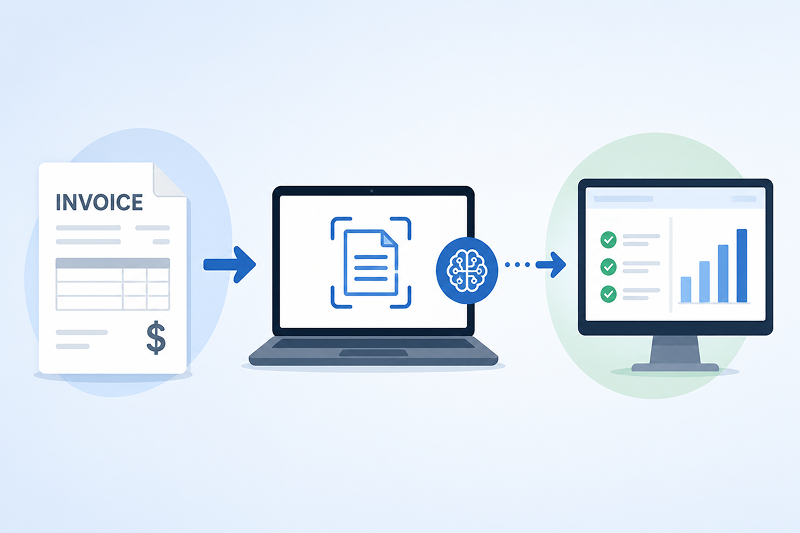
In practice, OCR in accounting is more like a chain reaction. One step triggers the next. A document comes in, data gets pulled out, the system checks whether that data makes sense, and then—assuming nothing looks wonky—it moves the information into the tools the accounting team already uses. That’s the real value. Not just reading. Routing, validating, organizing, pushing work forward.
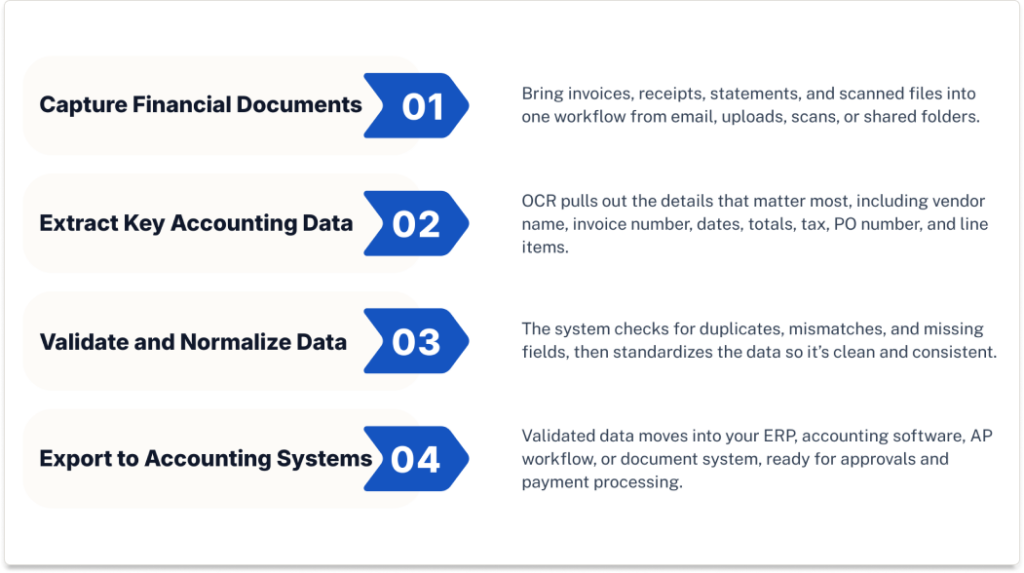
1. Capture Financial Documents
Everything starts with document intake, and this is usually messier than software demos make it look.
Accounting teams receive documents in all sorts of formats: PDF invoices, scanned copies from multifunction printers, emailed attachments, phone images of receipts, vendor statements, and old-fashioned paper records converted into digital files after the fact. Some are crisp and clean. Others look like they’ve been photocopied six times since 2019 and then dragged through a puddle. Life comes at AP teams fast.
A good OCR accounting workflow is built to handle that jumble without demanding that every supplier, employee, or internal stakeholder suddenly become organized overnight. Documents can arrive through inboxes, shared folders, upload portals, scanning stations, or integrated capture tools. The point is to gather them into one process instead of letting them drift around the business like loose shopping receipts in a glove compartment.
And this matters more than it sounds. Because if capture is clumsy, everything downstream suffers. Fast.
2. Extract Key Accounting Data
Once the document is captured, the OCR engine gets to work identifying the information that accounting teams actually need—not every word on the page, just the bits that matter.
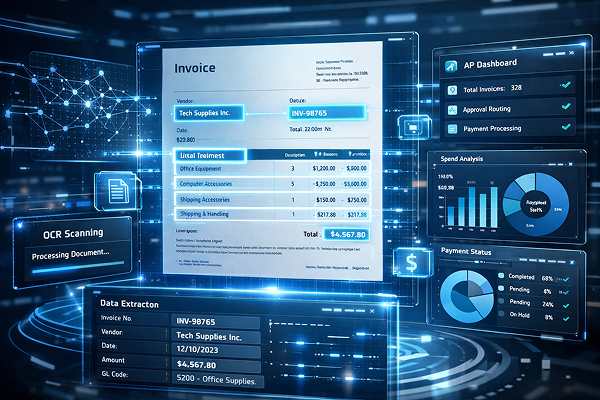
That usually includes vendor name, invoice number, invoice date, due date, PO number, subtotal, tax, total, and payment terms. On more complex documents, it may also extract line-item data, such as product descriptions, quantities, unit prices, GL-relevant details, or cost breakdowns. Which, frankly, is where things get really useful.
Because a finance team doesn’t just need a searchable image of an invoice. It needs structured data that can be sorted, checked, approved, matched, reported on. A scanned page sitting in a folder is better than a paper pile, sure, but it still leaves humans doing the heavy lifting. OCR accounting software aims to remove that bottleneck by lifting the key data out of the document and placing it into defined fields.
That’s the leap. It’s subtle, but huge.
Basic OCR may stop at recognizing text. Smarter systems go further—they identify labels, values, and document structure, so the software knows that “Net 30” is a payment term, not a random phrase, and that the larger number at the bottom of the invoice is probably more important than the tiny one in the header. Usually, anyway.
3. Validate and Normalize the Data
This is where OCR stops being a glorified reading tool and starts acting like part of a genuine accounting workflow.
After extraction, the system checks the captured data to make sure it holds together. That can include duplicate checks to flag invoices that may already exist in the system, field matching to confirm that expected values appear where they should, and tax and total validation to catch documents where the numbers don’t add up. Which happens more often than anyone wants to admit.
Many platforms also perform vendor master matching, comparing the extracted supplier information against known vendor records to reduce inconsistencies and misidentifications. So if one invoice says “ABC Industrial Ltd.” and another says “A.B.C. Industrial,” the system has a fighting chance of recognizing they’re the same vendor rather than creating unnecessary chaos.
When something looks off—missing PO number, duplicate invoice number, tax mismatch, unreadable total—the software can raise exception flags. In other words, it doesn’t just swallow bad data and hope for the best. It sends questionable items for review while allowing cleaner documents to keep moving. That split is important. Without it, automation tends to break down under the weight of edge cases and weird paperwork, and there is always weird paperwork.
Normalization plays a role here too. Dates may need to be standardized. Vendor names may need to align with internal records. Number formats may need cleaning up. One supplier writes “03/04/26,” another writes “4 March 2026,” and a third somehow sends a form that looks like it was built in Excel during the Bush administration. The system smooths those variations out so the accounting data is consistent once it lands downstream.
4. Export Data Into Accounting or ERP Systems
After capture, extraction, and validation, the final step is getting the data where it needs to go.
That could mean sending it into accounting software, syncing it with broader ERP platforms, routing it through accounts payable workflow systems, or storing the document and metadata inside a document management system for search, retrieval, and audit support. Sometimes it goes to several places at once. One path for transaction processing, another for storage, another for approvals. A bit of a relay race, really.
This is why OCR accounting isn’t just scanning dressed up in fancier clothes. Scanning creates a digital image. OCR-based automation creates a usable accounting record that can move through real business systems. Big difference.
Once exported, the data can support invoice approvals, PO matching, coding, payment scheduling, audit review, reporting, and all the other practical work that finance teams need to do every single week without turning the office into a low-grade panic room. And because the source document stays linked to the extracted information, users can usually trace a transaction back to the original file when questions come up—which, of course, they do.
So the workflow, in simple terms, goes like this: capture the document, extract the meaningful data, validate it, and move it into the systems that run accounting. That’s the heartbeat of OCR accounting. Not flashy. Just very, very useful.
OCR Technology in Accounts Payable
Accounts payable is one of the most valuable use cases for OCR in finance because AP teams deal with a constant flow of invoices, tight payment deadlines, and very little room for error. When invoice data has to be entered by hand, even a solid process can bog down fast. Approvals stall. Details get missed. Someone uploads the same invoice twice and suddenly nobody’s having a good day.
That’s where OCR technology in accounts payable makes a real difference.
Instead of forcing staff to type invoice details line by line, OCR captures the key data automatically from incoming documents. That includes invoice numbers, vendor names, dates, totals, tax amounts, PO references, and sometimes line items too. Once captured, that data can move straight into the next step of the AP workflow—review, coding, matching, approval, or export into the accounting system.
In practical terms, OCR helps solve a handful of common AP bottlenecks:
- Manual invoice entry, which is slow and error-prone
- Approval delays, when invoices sit in inboxes or wait for routing
- Mismatched data, such as invoice totals that don’t align with POs
- Lost invoices, especially when documents arrive through scattered channels
- Duplicate payments, caused by repeated submissions or duplicate entry
OCR also helps AP teams work faster without losing control. It supports invoice capture from PDFs, scans, and emailed attachments; helps with coding and routing by sending invoices into the right workflow; improves matching and validation by flagging missing or inconsistent details; and contributes to faster approvals because the data is already structured and easier to review. The result is better payment timing—fewer late payments, fewer missed discounts, and a clearer picture of outgoing cash.
Why Accounts Payable Teams Rely on OCR
AP teams lean on OCR for a simple reason: volume. They process a lot of invoices, in a lot of formats, from a lot of vendors who rarely make life easy. One sends a polished PDF. Another sends a scan that looks like it survived a fax machine from 2007. OCR helps bring order to that mess.
It also gives finance teams something they badly need: speed and control at the same time. Invoices can move faster through the system, but with better checks in place. And because the extracted data stays linked to the source document, OCR also supports stronger audit readiness. That means better visibility, cleaner records, and fewer frantic searches when someone asks where a number came from.
So, really, OCR in AP isn’t just about cutting data entry. It’s about helping the whole invoice process run with less friction—and a lot less chaos.
Key Benefits of OCR Accounting Software
The appeal of OCR accounting software isn’t hard to spot. It takes one of the most repetitive, error-prone parts of finance work—document handling and data entry—and makes it far less painful. Not glamorous, no. But valuable? Absolutely.
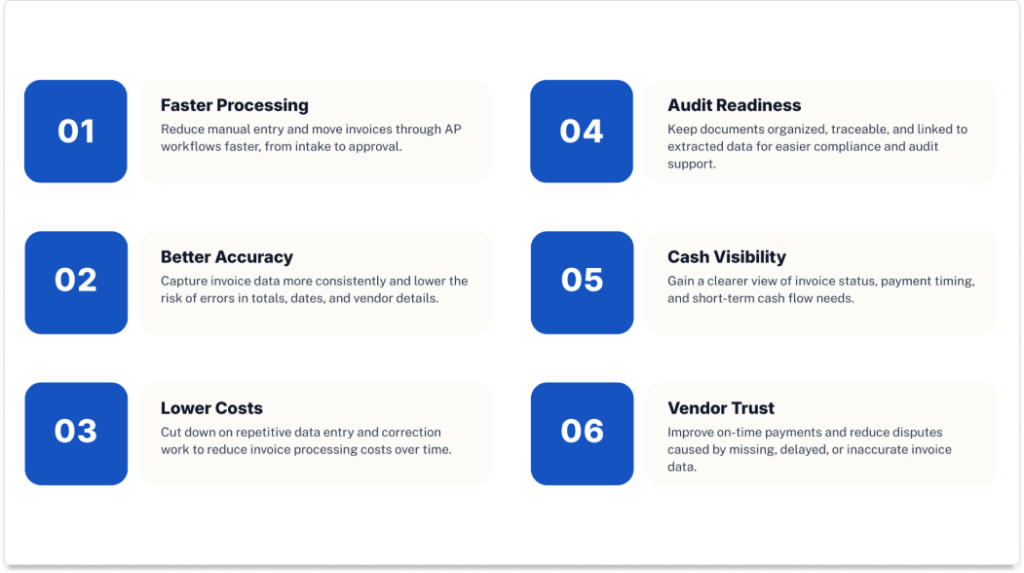
Faster Processing Times
This is usually the first win teams notice.
Instead of entering invoice data by hand, staff can review data that’s already been captured and move it along faster. That speeds up the whole AP cycle, from intake to approval. Fewer delays. Less backlog. A lot less chasing paperwork around.
Better Accuracy
Manual entry invites mistakes. A wrong digit in a total, a missing due date, a vendor name entered inconsistently—it happens. More than people like to admit, frankly.
OCR accounting software reduces that risk by pulling data directly from the source document. It’s not flawless, but it’s typically far more consistent than typing everything in by hand, especially at volume.
Lower Processing Costs
Repetitive work costs money, even when it looks harmless on the surface.
The more time your team spends keying in invoice details, correcting errors, and rechecking records, the more expensive the process becomes. OCR helps cut that labor burden down, which can lower the cost of processing each invoice over time. Simple idea. Big impact.
Improved Compliance and Audit Readiness
Finance teams need clean records, not just fast workflows.
OCR software helps by keeping documents organized, searchable, and tied to the extracted data. That makes it easier to trace where information came from, verify approvals, and support audits without digging through inboxes, folders, or old attachments that nobody named properly.
More Visibility Into Cash Flow
When invoice data gets captured faster, finance teams get a clearer view of what’s coming due and when.
That means better visibility into liabilities, payment timing, and short-term cash requirements. It also makes it easier to spot bottlenecks before they turn into late payments or missed discounts. And, honestly, better visibility tends to calm people down.
Stronger Vendor Relationships
Vendors care about one thing more than almost anything else: getting paid correctly and on time.
When OCR reduces delays, errors, and duplicate handling, payments tend to go out more smoothly. That means fewer disputes, fewer awkward follow-up emails, and better supplier relationships overall. Which may sound soft compared to cost savings, but it matters. A lot.
Taken together, these benefits are why so many finance teams look at OCR accounting software as more than a convenience. It’s a way to build a faster, cleaner, more reliable AP process—without piling more manual work onto the people already trying to keep everything moving.
Common Use Cases for OCR in Accounting
Invoices tend to get all the attention—and fair enough, they’re the main event—but they’re not the whole story. OCR in accounting shows up in a few other places too, usually wherever finance teams are stuck dealing with paper, PDFs, or documents that someone has to read before anything useful can happen.
Invoice Processing
This is the biggest use case by far.
OCR helps capture invoice data from incoming documents and turn it into structured information that AP teams can review, validate, and route for approval. That means less manual entry, faster processing, and fewer opportunities for errors to creep in. For companies handling a steady stream of supplier invoices, this is usually where the return shows up first.
Receipt and Expense Document Capture
OCR is also useful for receipts, expense documents, and reimbursement records.
Instead of asking finance staff to pull dates, amounts, merchant names, and tax details by hand, OCR can extract that information automatically. That makes expense reconciliation faster and helps keep records more complete—especially when employees submit a mixed bag of PDFs, scans, and phone photos that are, let’s say, less than beautifully organized.
Purchase Order and Supporting Document Matching
In many AP workflows, an invoice isn’t reviewed on its own. It needs to be checked against a purchase order, receiving document, or other supporting file before it can be approved.
OCR helps by capturing data from those documents as well, which makes matching faster and more consistent. It gives accounting teams a better way to validate quantities, pricing, vendor details, and totals without relying on someone to compare everything manually line by line.
Vendor Document Management
Supplier paperwork piles up quickly—credit memos, statements, tax forms, updated account details, onboarding documents, and the rest of the usual paper parade.
OCR can help digitize and organize those records so they’re easier to search, retrieve, and connect to the right vendor profile. That improves visibility and cuts down on the time spent hunting for documents across inboxes, shared folders, and filing cabinets that probably should’ve retired years ago.
Historical Accounting Record Digitization
Some finance teams also use OCR to deal with older records.
Archived invoices, paper statements, and legacy accounting files can be scanned and converted into searchable digital records. That doesn’t just save storage space—it makes historical information much easier to access when someone needs to review past transactions, answer an audit question, or dig up a document from three years ago that nobody thought would matter until, suddenly, it did.
What to Look for in OCR Accounting Software
Not all OCR accounting software is built the same. Some tools are perfectly fine for turning a document into searchable text, but that’s not really enough for accounting. Finance teams need software that can pull out the right data, catch issues early, and slot neatly into the systems they already depend on. Otherwise, you’re just moving the mess around.
High Extraction Accuracy
This one’s non-negotiable.
If the software struggles to capture invoice numbers, tax amounts, due dates, or totals correctly, it’s going to create more work than it saves. Strong extraction accuracy is especially important in AP, where even a small mistake can lead to payment errors, mismatched records, or awkward cleanup later.
Line-Item Recognition
For many businesses, header-level invoice data isn’t enough.
You may also need the software to capture individual line items—product descriptions, quantities, unit prices, and extended totals. That matters for detailed invoice review, coding, cost allocation, and matching against purchase orders. Without line-item recognition, some workflows still end up half-manual, which rather defeats the point.
Multi-Format Support
Accounting documents don’t arrive in one tidy format. They show up as PDFs, scanned files, images, email attachments, and vendor layouts that seem determined to be difficult.
A good OCR solution should handle that variety without falling apart every time a supplier changes its template. The more formats it can process reliably, the less friction your team deals with on the intake side.
Validation Rules and Exception Handling
Capturing data is only part of the job. The software should also help check whether that data makes sense.
Look for validation features that can flag duplicate invoices, missing PO numbers, tax mismatches, or totals that don’t add up. Exception handling matters too, because not every document should move straight through untouched. Clean invoices can keep going; questionable ones should be kicked out for review. That’s a healthier setup.
ERP and Accounting System Integration
OCR software needs to fit into your workflow, not sit awkwardly beside it like an expensive side project.
Integration with ERP platforms, accounting systems, AP tools, and document management systems is essential. The best solutions export data directly into the systems your team already uses, which helps reduce rekeying and keeps processes connected. And, yes, this usually matters more than flashy features on a sales page.
Security and Audit Controls
Finance data is sensitive. No wiggle room there.
That means OCR accounting software should support strong security controls, including encryption, user permissions, document retention policies, and activity logs. Audit controls matter too, especially if your team needs to show where data came from, who reviewed it, and how it moved through the process.
Scalability
What works for 200 invoices a month may not work for 2,000.
As document volume grows, the software should be able to keep up without forcing your team back into manual workarounds. Scalability matters not just for growth, but for seasonal spikes, acquisitions, and those busy periods when everything seems to land at once.
One more thing—worth saying plainly. The best OCR accounting software usually works with your existing systems rather than trying to force a full ERP replacement. Most finance teams aren’t looking to rip out their core platforms just to improve document capture. They want something that fits, supports the current workflow, and makes life easier without turning implementation into a whole saga.
Final Thoughts: From OCR Accounting to Smarter AP Automation
At the end of the day, OCR accounting is really about turning static financial documents into usable accounting data. That’s the shift. Instead of invoices, receipts, and statements sitting around as files someone has to open, read, and manually enter, the information becomes structured, searchable, and ready to move through the workflow.
And that’s where the real payoff tends to show up—in accounts payable.
AP teams usually feel the benefits first because they’re dealing with high document volume, repetitive entry, approval bottlenecks, and constant pressure to keep payments on track. When OCR removes some of that manual lift, invoice processing gets faster, cleaner, and a good deal less chaotic. Not perfect, obviously. But much better.
For teams looking to go beyond basic document capture, invoice automation is usually the next logical step. If your goal is faster approvals, better accuracy, and smoother invoice workflows from intake through payment, it makes sense to explore invoice OCR software built specifically for AP. Because once you’ve seen what OCR can do in accounting, typing invoice data in by hand starts to feel a bit ancient.