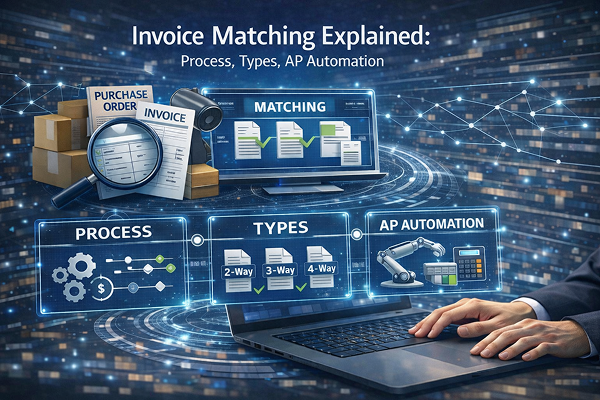
Let’s be honest—invoice matching isn’t exactly cocktail party conversation. It’s one of those behind-the-scenes, grind-it-out tasks that quietly keeps businesses from bleeding money. But strip away the jargon, and it’s actually pretty straightforward. At its core, invoice matching is just a verification step. You’re checking whether an invoice lines up with what was ordered (the purchase order) and what actually showed up at the door (the receipt). Simple, right? Well… not always.
Somewhere along the accounts payable workflow—usually between “we got the bill” and “go ahead and pay it”—this matching process acts like a gatekeeper. No match, no payment. In theory, that’s comforting. In practice, it can feel like herding cats, especially when you’re juggling hundreds (or thousands) of invoices in different formats, with slightly-off numbers and the occasional “wait, where did this come from?” moment.
And lately? The pressure’s dialed up. More invoices, tighter margins, less patience for errors. One wrong digit, one duplicate payment—it adds up fast.
So, what’s really going on inside the invoice matching process? Why does it get messy? And—this is the part people actually care about—how are companies starting to automate the whole thing so it doesn’t eat up half the workweek?
Let’s dig in.
What Is Invoice Matching?
So, what are we really talking about here?
Invoice matching—at its simplest—is the act of comparing an invoice to the documents that are supposed to back it up. Typically, that means the purchase order (what you agreed to buy) and the receipt (what you actually received). If all three line up—prices, quantities, terms—great. You pay it. If not… well, now you’ve got a problem to untangle.
The purpose sounds almost boringly practical, but it’s critical. First, it helps prevent overpayments—no one wants to accidentally pay for 500 units when only 300 showed up. Second, it ensures accuracy across your financial records (which, let’s face it, auditors care about a lot more than anyone else does). And third, there’s compliance—because regulations don’t really care if your AP team was “just busy that week.”
In the broader accounts payable workflow, invoice matching sits right before approval and payment. It’s the checkpoint. The “are we sure about this?” moment.
Matching sounds simple—but in practice, it’s one of the most time-consuming AP tasks.
Why Invoice Matching Is Critical for Accounts Payable
Here’s where things start to get… a little painful.
On paper, invoice matching is a simple check. In reality, it often turns into a slow, manual grind. Someone’s keying in data. Someone else is double-checking it. And somewhere along the way, numbers don’t quite line up—different systems, slightly different formats, maybe even a typo that slipped through at 4:47 PM on a Friday. It happens.
The usual headaches pile up fast:
- Manual data entry and validation (time-consuming, error-prone—pick your poison)
- Mismatched data between systems that don’t quite “talk” to each other
- Approvals stuck in limbo because something doesn’t reconcile
- And, yes, the occasional duplicate or even fraudulent payment slipping through
Now zoom out for a second. The impact isn’t small. Processing a single invoice can cost anywhere from $12 to $30, which doesn’t sound terrible—until you multiply it by thousands. Add in missed early-payment discounts (money left on the table), rising fraud risk, and slower financial close cycles… suddenly, it’s not just an AP issue. It’s a business problem.
And honestly? It all ties back to the same root cause: manual processes, scattered systems, and just enough friction to slow everything down.
Types of Invoice Matching
Not all invoice matching is created equal. There’s a bit of a spectrum here—and where a company lands usually depends on how complex their purchasing process is (or how risk-averse they’ve become after a few painful mistakes).
2-Way Matching
This is the lightweight version. Just the invoice and the purchase order—nothing fancy.
You’re essentially asking: Does this bill match what we agreed to buy? If the pricing and quantities line up, you’re good to go. It’s commonly used for simpler purchases—services, subscriptions, low-risk items where there’s no physical delivery to verify. Quick, relatively painless… but also easier to miss things.
3-Way Matching
Now we’re getting more serious.
Here, you’re matching the invoice to both the purchase order and the receipt. So it’s not just “Did we order this?” but also “Did we actually receive it?” This extra layer is huge in industries like manufacturing and distribution, where shipments can be partial, delayed, or—let’s be honest—occasionally wrong.
It adds protection. And a bit more work.
4-Way Matching (Optional)
This one’s for the cautious—or the highly regulated.
In addition to invoice, PO, and receipt, there’s an inspection or quality check involved. Basically: Was what we received acceptable? You’ll see this in industries dealing with strict compliance or high-value goods, where a bad shipment isn’t just inconvenient—it’s expensive.
Mini takeaway?
More matching layers mean more control. But also… more complexity.
The Invoice Matching Process (Step-by-Step)
Alright, let’s walk through it—because “invoice matching process” sounds neat and tidy until you actually see how many moving parts are involved.
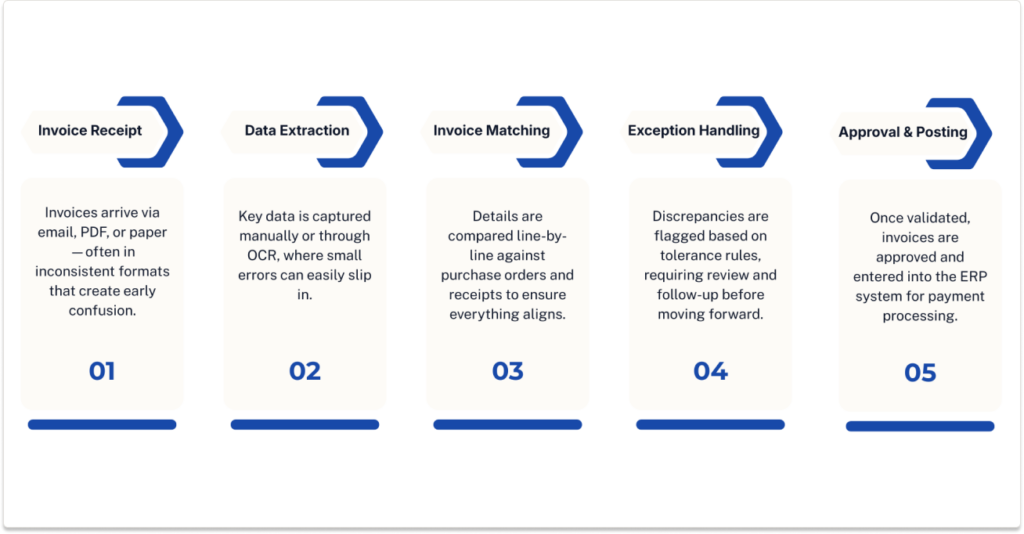
Step 1: Invoice Receipt
It usually starts innocently enough. An invoice comes in. Maybe by email. Maybe as a PDF. Sometimes—believe it or not—still on paper.
And right there, things begin to wobble. Different formats, different layouts, different ways vendors label the same information. It’s like everyone’s speaking the same language… just with wildly different accents.
Step 2: Data Extraction
Next comes pulling the data out. Either someone manually keys it in (slow, tedious, prone to “oops” moments), or you use OCR to capture it automatically.
This step? It’s a hotspot for errors. A misplaced decimal, a swapped digit—it doesn’t take much.
Step 3: Matching Against PO and Receipt
Now the real comparison begins.
Line by line. Quantity by quantity. Price by price. Terms, dates, discounts—everything gets scrutinized. And if something feels off, even slightly, it usually is.
Step 4: Exception Handling
Here’s where things either flow… or grind to a halt.
Tolerance checks kick in—are price differences within an acceptable range? Are quantities close enough? If not, the system (or a human) flags it. And suddenly, you’re chasing down answers.
Step 5: Approval & Posting
If everything checks out, the invoice moves forward. Routed for approval. Entered into the ERP. Ready for payment.
Sounds smooth. Sometimes it is.
But here’s the catch:
Even a single mismatch—one tiny inconsistency—can stall the entire workflow. And when that happens across dozens (or hundreds) of invoices… well, you can imagine how quickly things back up.
Challenges in the Manual Invoice Matching Process
This is the part most teams don’t love talking about—but it’s where the real friction lives.
Manual invoice matching is, frankly, a time sink. Five to ten minutes per invoice might not sound dramatic, but stack that across hundreds or thousands each month and suddenly you’re looking at hours… days… entire workweeks disappearing into what feels like administrative quicksand. It creeps up on you.
Then there’s the human factor. Manual entry almost guarantees errors—maybe not big, obvious ones, but the small, annoying kind. A transposed number. A missed line item. Enough to trigger mismatches and send someone down a rabbit hole trying to figure out what went wrong.
And it’s not just data entry. The rules themselves get complicated. Pricing tolerances, vendor-specific terms, partial shipments—it’s rarely a clean, one-to-one comparison. Add in the fact that most teams are bouncing between ERP systems, email threads, and the occasional spreadsheet workaround… well, things get messy fast.
Visibility? Often lacking. Exceptions sit in limbo.
The end result is hard to ignore: AP teams spending more time chasing discrepancies than actually driving value—basically functioning as overqualified data entry clerks, which, let’s be honest, isn’t what anyone signed up for.
How Automation Transforms Invoice Matching
Now—here’s where things start to shift. And honestly, it’s a bit of a relief.
Instead of people manually pulling data, double-checking numbers, and chasing down mismatches, automation steps in and handles the heavy lifting. Quietly. Consistently. Without getting tired at 4:47 PM.
First, it captures invoice data automatically using OCR or AI—no more retyping the same fields over and over. Then it matches invoices against purchase orders and receipts in real time, applying all those business rules (pricing tolerances, vendor terms, quantity checks) without anyone having to think twice about them. And when something doesn’t match? It flags only the exceptions. Not everything. Just the stuff that actually needs attention.
That’s the key difference. You’re no longer digging through every invoice—you’re only dealing with the outliers.
The impact tends to be pretty dramatic:
- Processing speeds jump—often 75% faster
- Accuracy climbs to 99% or better
- Fraud risks shrink (less manual handling, fewer gaps)
- Approvals move quicker because there’s less back-and-forth
And maybe most importantly—AP teams finally get out of the weeds. They stop reacting… and start actually managing the process.
AI-Powered Invoice Matching (The Next Evolution)
Here’s where things get… interesting.
Traditional automation is helpful, sure—but it’s a bit like following a recipe to the letter. Rule-based systems do exactly what they’re told. No more, no less. If something falls outside those predefined rules? They struggle. Or worse, they break.
AI changes that dynamic.
Instead of rigid logic, AI-powered invoice matching adapts. It learns. Over time, it starts to recognize vendor patterns—how certain suppliers structure invoices, where discrepancies usually show up, what “normal” looks like for your business. That’s not something rule-based systems handle well, if at all.
It also tackles the messy stuff. Complex, line-item-heavy invoices. Multi-tier pricing. Slight variations that would normally trigger manual review. AI can process all of that and apply tolerance logic dynamically—meaning it knows when a small difference is acceptable and when it’s actually a problem.
The result? A massive reduction in manual validation work—often 80–90% less.
You really see the impact in high-volume environments. Manufacturing, distribution, anywhere invoices aren’t neat and predictable. That’s where AI doesn’t just help—it fundamentally changes how the process works.
How ACOM Automates the Invoice Matching Process
Let’s call it what it is. Manual invoice matching is slow, error-prone, and—over time—surprisingly expensive. It eats up hours, introduces avoidable mistakes, and turns what should be a straightforward process into a daily bottleneck.
The impact shows up everywhere. Payments get delayed. Early-payment discounts slip through the cracks (and no one’s happy about that). Skilled AP staff end up buried in repetitive tasks instead of doing, you know, work that actually moves the business forward.
This is exactly where ACOM’s Auto Ledger steps in—and it doesn’t just “assist,” it fundamentally changes the workflow.
Auto Ledger uses AI to automatically extract data from invoices, purchase orders, and receipts—no manual entry required. From there, it performs 2-way and 3-way matching in real time, applying business rules and tolerance checks behind the scenes. If everything aligns, it moves forward. If not, it flags only the exceptions for review.
That last part matters more than people expect.
The outcomes tend to speak for themselves: processing costs drop by as much as 75%, accuracy climbs close to 100%, and manual matching effort… basically disappears. AP teams aren’t stuck reacting anymore—they’re freed up to focus on higher-value work.
And somewhere along the way, something shifts—AP stops being a cost center and starts pulling its weight as a strategic part of the business.
Invoice Matching vs Invoice Processing: What’s the Difference?
People mix these up all the time. Honestly, I used to as well.
Invoice processing is the big picture—it’s the entire lifecycle. From the moment an invoice lands in your inbox (or on someone’s desk… or buried in a shared folder) all the way through to approval, posting, and payment. It includes capturing the data, routing it, validating it, storing it—the whole journey.
Invoice matching, on the other hand, is just one piece of that puzzle. A critical one, yes—but still just a step. It’s the validation checkpoint where you compare the invoice against the purchase order and receipt to make sure everything adds up before money leaves the building.
Think of it like this: processing is the highway, matching is the toll booth. You can’t skip it.
And here’s the thing—both matter. A lot. You can automate invoice capture and approvals all you want, but if your matching process is clunky or inconsistent, everything slows down anyway. Bottlenecks don’t care how modern the rest of your workflow is.
Final Thoughts: Why Invoice Matching Is the Key to AP Efficiency
If there’s one thing that tends to get overlooked, it’s this: invoice matching isn’t just another AP task—it’s the hinge everything swings on.
When it works, things flow. Payments go out on time, numbers make sense, nobody’s scrambling at month-end trying to explain a discrepancy that should’ve been caught earlier. But when it doesn’t? Everything slows down. Quietly at first, then all at once.
We’ve seen the progression. Manual matching—painfully slow, full of little errors that add up. Then automation came along and helped clean things up, made it faster, more consistent. And now AI is pushing it further—handling complexity, learning patterns, removing most of the guesswork altogether.
It’s not just about speed (though that helps). It’s about control. Visibility. Confidence in your numbers.
And, stepping back for a second, this is really part of something bigger. Digital transformation isn’t always flashy—it’s not always dashboards and big announcements. Sometimes it’s this. Fixing the core processes that quietly drain time and money.
Invoice matching just happens to be one of the biggest levers.
Get it right, and everything downstream gets easier. Miss it, and you’re always playing catch-up.