The order went out Monday. Your system says it was sent. On Thursday, the customer calls: they never received a usable file, the shipment is late, and a chargeback is on the way.
Nothing crashed. No one got an alert. The transaction failed somewhere between your ERP and your trading partner, and nobody noticed until the customer did.
That’s the real risk in electronic data interchange. Most failures aren’t loud. They’re silent, and the longer they stay silent, the more they cost.
This article covers where EDI transactions break, what those failures cost, and what good exception management looks like, so your team finds problems while there’s still time to fix them.
Where EDI transactions break
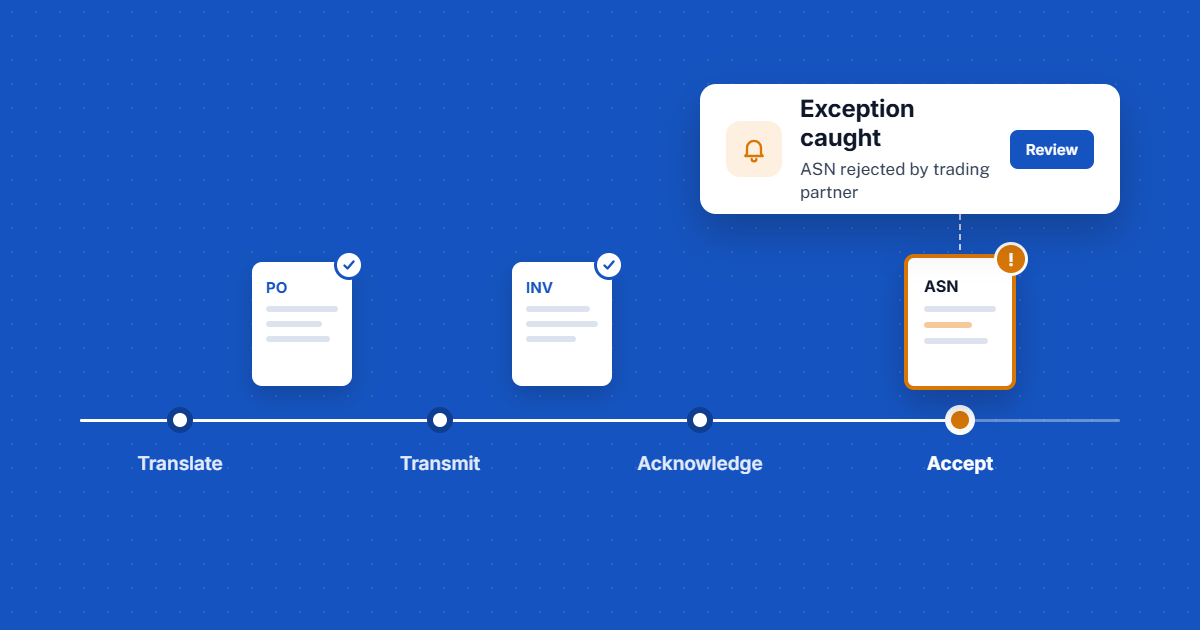
Every outbound EDI document moves through the same four stages. A failure can happen at any of them, and one failure sits outside the path entirely.
The path every EDI document takes, and where it can fail
- TranslationYour data is mapped to the partner’s format
- TransmissionThe file travels over AS2, FTP/S or a VAN
- AcknowledgmentThe partner confirms the file was received and readable
- Business rulesThe partner accepts or rejects the content
And the document that never came. An expected order, schedule or acknowledgment doesn’t arrive, and nothing in the path flags it.
1.Translation and mapping
Your ERP data doesn’t line up with what the partner’s implementation guide expects. A field lands in the wrong place, a required value is blank, or a code doesn’t match. The file may still go out, but it won’t process cleanly on the other side. In automotive, a common case is purchase orders mapped into the wrong fields. Mapping problems are easy to miss until a partner rejects the file, which is why mapping accuracy deserves its own attention.
2.Transmission
The file never arrives. A connection drops, a certificate expires, or a VAN mailbox isn’t picked up. From your side, it looks sent.
3.Acknowledgment
A functional acknowledgment confirms the file was received and could be read. Many teams treat it as the finish line.
Received isn’t the same as accepted. Your partner can still reject the content after acknowledging the file. Learn why a clean acknowledgment doesn’t mean the document was accepted.
4.Business rejection
The file was valid, but the data was wrong for this customer: a quantity, a part number, a ship date, a label reference. Advance ship notices are a frequent example, which is why getting the ASN right matters so much. Another is release quantities that don’t reconcile with what the customer expects.
5.The document that never came
Sometimes the problem isn’t a bad file. It’s a missing one. An expected document simply doesn’t arrive, and no one is alerted. For suppliers on tight delivery windows, a missing or late sequence file can affect the customer’s production line the same day.
What silent failures cost
The cost of an EDI failure grows with every hour it goes unnoticed.
- Chargebacks and penaltiesMany large customers fine suppliers for missing, late or inaccurate documents. Staying within their EDI compliance requirements is part of keeping the account.
- Delayed cashA rejected invoice isn’t paid. Every day spent finding and fixing it stretches your order-to-cash cycle.
- Rework and firefightingStaff stop their work to dig through files, call partners and rekey data by hand.
- Strained relationshipsCustomers measure suppliers on EDI performance. Repeated errors put the relationship, and future business, at risk.
The failure itself is often small. What makes it expensive is finding out late.
What good EDI exception management looks like
You can’t prevent every error. You can make sure your team sees it first. Strong exception management comes down to five capabilities.
- Alerts that reach the right person. Not a log someone checks on Friday, but a notification when a document fails, is rejected or doesn’t arrive.
- Automatic acknowledgment reconciliation. Every outbound document is matched to its acknowledgment, so anything unconfirmed stands out.
- A full record of what happened. For any document, you can see how it was translated and where it stopped.
- Search by business data. Your team finds a transaction by PO or invoice number, not by file name or timestamp.
- Fast correction. When a map is wrong, you fix it and confirm the result quickly, without a long rebuild-and-retest cycle.
A simple test: if your team can’t answer “did that order go through?” in a minute or two, you have gaps to close. These are also some of the clearest signs your EDI software needs an upgrade.
How EZConnect helps you catch exceptions early
EZConnect is ACOM’s EDI/XML integration platform for IBM and Windows environments. It’s built to give your team visibility into every transaction, not just the ones that work.
| What you need | How EZConnect delivers it |
|---|---|
| Alerts that reach the right person | Flexible, real-time notifications you configure yourself, so your team can react as soon as something happens. |
| Acknowledgment reconciliation | Functional acknowledgments are generated and reconciled automatically, notifying both parties when transactions are sent and received. |
| A full record of what happened | A complete log of how each document was translated, available for review after processing. |
| Search by business data | Document tracking that uses file content, such as PO or invoice number, as search criteria. |
| Fast correction | Real-time mapping: view results on live transactions and correct errors without a compile-and-retest cycle. |
| Records you can rely on | Data retention policies set by trading partner and document type. |
EZConnect also works with the systems and partners you already have. It handles EDI (X12 and EDIFACT), XML, delimited and fixed-length files, connects directly to ODBC-compliant databases, and communicates over AS2, FTP/S, VANs and web services. It integrates with ERP, accounting and warehouse systems, including JD Edwards, Oracle, SAP and Epicor. See how it simplifies trading partner communications.
The outcome: fewer surprises, faster fixes
When exceptions surface on your side first, a failed transaction becomes a quick correction instead of a customer complaint. Your team spends less time chasing files and rekeying data. Invoices move faster. And trading partners see a supplier they can rely on.
EDI will never be error-free. But it can be surprise-free.
Frequently asked questions
What is EDI error handling?
EDI error handling is how a business detects, investigates and corrects transactions that fail during translation, transmission, acknowledgment or partner validation.
What are the most common causes of EDI errors?
Mapping mismatches between your system and the partner’s requirements, failed transmissions, missing acknowledgments, data that breaks a partner’s business rules, and expected documents that never arrive.
Does a functional acknowledgment mean my document was accepted?
No. It confirms the file was received and could be read. Your partner can still reject the content afterward.
How can I find a specific EDI transaction quickly?
Use an EDI platform that lets you search by business data, such as a PO or invoice number, rather than by file name or date.
How do I know if an expected EDI document didn’t arrive?
You need alerts and acknowledgment reconciliation that flag missing documents, not just failed ones. Without that, a missing file stays invisible until someone asks for it.