Every manually entered invoice costs your accounts payable team time, money, and opportunities.
As invoice volumes grow, so do processing costs, approval delays, duplicate payment risks, and missed early-payment discounts. What starts as a manageable manual process quickly becomes difficult to scale, especially when invoices arrive through email, PDFs, supplier portals, and paper documents.
For many organizations, AP staff still spend valuable time opening invoices, reading every field, and manually entering information into an ERP or accounting system. While the process works, it’s repetitive, expensive, and highly susceptible to human error.
That’s why more finance teams are replacing manual data entry with AI-powered invoice data extraction. Instead of typing invoice information line by line, intelligent software automatically captures, validates, and organizes invoice data—allowing AP professionals to spend less time entering data and more time managing exceptions, improving cash flow, and strengthening supplier relationships.
Today’s invoice data extraction software combines Optical Character Recognition (OCR), artificial intelligence (AI), and machine learning to automate invoice processing with greater speed and accuracy than traditional OCR alone.
In this guide, we’ll explain what invoice data extraction is, how it works, and why AI-powered automation is becoming the foundation of modern accounts payable.
What Is Invoice Data Extraction?
Before looking at how the technology works, it’s helpful to understand exactly what invoice data extraction does—and why it has become a critical part of modern accounts payable automation.
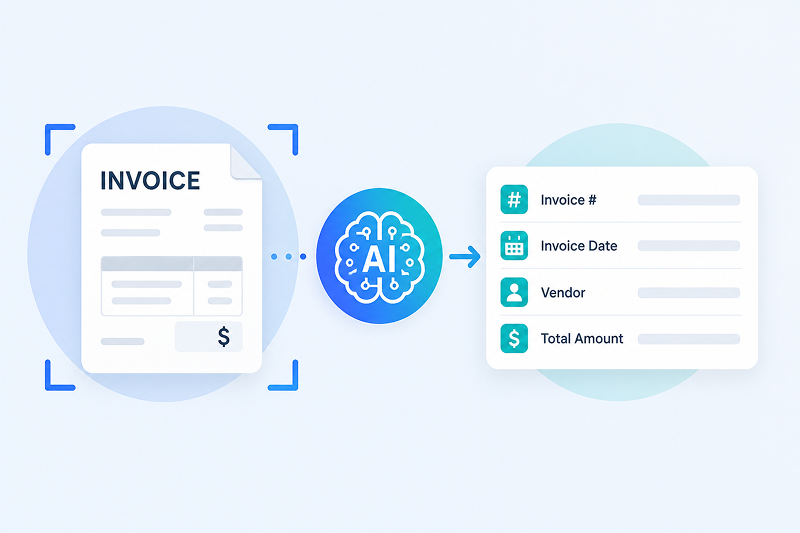
Invoice data extraction is the process of automatically capturing important information from invoices and converting it into structured digital data that accounting and ERP systems can use.
Instead of manually typing information into your software, an automated system identifies key fields and extracts the data for review or direct processing.
Typical invoice data includes:
- Vendor name
- Invoice number
- Invoice date
- Purchase order number
- Payment terms
- Line items
- Tax amounts
- Shipping charges
- Invoice total
The goal is to transform unstructured documents into usable business data. This process is often called extracting structured data from invoices, because it converts information from PDFs, scanned documents, or images into a consistent format that software can understand.
Modern solutions can extract information from invoices regardless of how they arrive. Whether you need to extract invoice data from PDF files, emailed invoices, or even extract invoice data from image files captured by a scanner or mobile device, the process follows the same basic workflow.
The result is faster invoice processing, fewer manual tasks, and more consistent financial records. Instead of spending time entering data, AP teams can focus on reviewing exceptions, managing supplier relationships, and improving cash flow.
Why Manual Invoice Data Entry Is No Longer Sustainable
Manual invoice entry may be manageable when invoice volumes are low, but it becomes increasingly expensive and difficult to sustain as a business grows.
Every invoice requires someone to open the document, review the information, enter data into the ERP, verify accuracy, and route it for approval. As suppliers increase and invoice formats become more diverse, these repetitive tasks consume valuable AP resources while creating more opportunities for delays and errors.
The result isn’t just slower processing—it impacts the entire business.
Common challenges include:
- Data entry errors
- Duplicate payments
- Lost invoices
- Slow approvals
- Missed early-payment discounts
- Limited visibility into invoice status
These problems are worse when invoices arrive in different formats. Some come as PDFs. Others arrive as scanned images, email attachments, or paper documents.
Automated invoice data extraction reduces that manual work. It captures key invoice data automatically, so AP teams can spend more time reviewing exceptions and less time typing information into systems.
How Invoice Data Extraction Works
Invoice data extraction is only the first step.
Once invoice information has been captured accurately, modern AP automation platforms validate business rules, identify duplicate invoices, route documents through approval workflows, and deliver approved transactions directly into ERP and accounting systems. This transforms invoice capture from a standalone task into a connected, automated accounts payable process.
1. Capture the Invoice
The process begins when an invoice enters your AP workflow. It may arrive as a PDF attachment, a scanned paper invoice, or a photo taken with a mobile device.
Modern platforms can extract invoice data from PDF files and extract invoice data from image files without requiring employees to manually sort or prepare the documents.
2. Read the Invoice with OCR
Optical Character Recognition (OCR) scans the document and converts printed text into digital text that software can read.
This OCR invoice data extraction step identifies information such as invoice numbers, dates, vendor names, and totals. However, OCR alone only reads text. It doesn’t understand what that information means.
3. Interpret the Data with AI
Artificial intelligence adds context to the extracted data. Instead of simply recognizing text, AI identifies fields, understands different invoice layouts, and learns from previous documents.
This approach, often called invoice data extraction using AI, allows the software to process invoices from new suppliers without relying on rigid templates.
4. Validate and Export the Data
Before the data reaches your ERP or accounting system, it is validated against business rules. Missing fields, duplicate invoices, or unusual values can be flagged for review.
Once verified, the extracted invoice data can be routed for approval or sent directly to downstream financial systems.
OCR vs. AI Invoice Data Extraction
Traditional OCR and AI are often mentioned together, but they serve different purposes.
OCR focuses on reading text. AI focuses on understanding it.
| OCR | AI-Powered Invoice Data Extraction |
|---|---|
| Converts text into digital data | Understands the meaning of the data |
| Often relies on fixed templates | Adapts to different invoice layouts |
| Requires more manual corrections | Learns from previous invoices |
| Struggles with new vendor formats | Handles new suppliers more effectively |
This difference is especially important for organizations that receive invoices from hundreds of vendors. Every supplier formats invoices differently, making template-based OCR difficult to maintain.
By combining AI with OCR, modern invoice automation platforms can recognize invoice layouts, classify fields, and improve accuracy over time without relying on rigid templates.
The result is fewer manual corrections, faster approvals, lower processing costs, and an AP team that can focus on managing exceptions instead of entering data.
What Data Can Be Extracted from an Invoice?
The goal of invoice data extraction is to capture the information your AP team needs without manual entry. The extracted data can then be validated, routed for approval, or sent directly to your ERP.
Most solutions can extract:
- Vendor name
- Invoice number
- Invoice date
- Purchase order number
- Payment terms
- Line items
- Quantities
- Unit prices
- Tax amounts
- Shipping charges
- Invoice total
Modern platforms excel at extracting structured data from invoices, even when suppliers use different layouts. Instead of relying on fixed templates, AI identifies where each field belongs and organizes it into a consistent format.
This structured invoice data is what allows downstream automation, such as duplicate detection, three-way matching, approval workflows, and payment processing.
Benefits of Automated Invoice Data Extraction
Automating invoice data extraction does much more than eliminate manual data entry. It creates the foundation for a faster, more efficient accounts payable operation.
With accurate invoice data flowing directly into approval workflows and ERP systems, finance teams can process more invoices with fewer resources while improving visibility, reducing risk, and strengthening supplier relationships.
Invoices move through the workflow faster because employees spend less time typing information and more time reviewing exceptions that require attention.
Some of the biggest benefits include:
- Faster invoice processing
- Fewer data entry errors
- Lower processing costs
- Improved invoice visibility
- More consistent financial records
- Better compliance and audit readiness
Automation also helps businesses scale. As invoice volumes grow, finance teams can process more invoices without adding the same level of administrative work.
Instead of spending hours entering invoice data, AP professionals can focus on resolving discrepancies, strengthening supplier relationships, and improving cash flow.
Common Challenges with Invoice Data Extraction
No two suppliers create invoices the same way. One may send a clean, digital PDF, while another submits a scanned document with handwritten notes or an unfamiliar layout.
That’s one reason invoice data extraction has historically been difficult. Older OCR systems often depended on fixed templates, so even small layout changes could reduce accuracy and increase the need for manual review.
Today’s AI-powered solutions are far more flexible. They can identify invoice fields based on context rather than position, making them better equipped to handle different formats and new vendors.
That said, no system is perfect. Poor image quality, missing information, or unusual invoice formats can still require human review. The goal isn’t to eliminate people from the process—it’s to reduce the number of invoices that need manual attention.
As AI continues to improve, finance teams can expect higher accuracy, fewer exceptions, and a more efficient invoice processing workflow.
The Future of Invoice Data Extraction
Invoice processing has come a long way from manually typing data into accounting systems. What started with basic OCR has evolved into intelligent automation that can understand documents, identify exceptions, and continuously improve over time.
The next step is even more interesting. Instead of simply extracting invoice data, AI is beginning to support the decisions that happen afterward.
For example, modern platforms can flag duplicate invoices, identify missing purchase orders, detect unusual payment amounts, or recommend the correct GL code based on historical transactions. Some can even route invoices to the right approver without human intervention.
This doesn’t replace the AP team. It allows them to spend less time on repetitive tasks and more time managing exceptions, strengthening supplier relationships, and improving financial performance.
As organizations continue to digitize their finance operations, invoice data extraction using AI will become a foundational part of accounts payable automation rather than a standalone capability.
Bringing Invoice Data Extraction into Your AP Process
Implementing invoice data extraction doesn’t mean replacing your ERP or changing every AP process overnight. Most organizations start by automating invoice capture while leaving their existing approval workflows in place.
Once the data is extracted, it flows into the systems your team already uses. Employees spend less time entering information manually and more time reviewing exceptions that actually require their attention.
That gradual approach makes adoption easier. It also allows finance teams to improve accuracy and efficiency without disrupting day-to-day operations.
Conclusion
Manual invoice entry isn’t just time-consuming. It also increases the likelihood of errors, slows approvals, and makes it harder for AP teams to scale as invoice volumes grow.
That’s why invoice data extraction has become a core part of modern accounts payable automation. By combining OCR with AI, businesses can capture invoice data more accurately, reduce repetitive work, and give finance teams more time to focus on higher-value tasks.
Whether you’re evaluating invoice data extraction software for the first time or looking to improve an existing AP process, understanding how these technologies work is the first step. Solutions like ACOM’s Accounts Payable Automation platform combine AI-powered invoice data extraction, intelligent approval workflows, and seamless ERP integration to help organizations reduce manual work, improve accuracy, and process invoices faster.