Accounts payable rarely attracts attention when everything is running smoothly. When it slows down, however, the impact is felt quickly: vendors follow up on overdue payments, approvals stall, month-end close becomes more stressful, and finance teams lose valuable time searching for missing invoice details.
This is why ai in accounts payable is becoming less of a future-facing concept and more of a practical priority. Finance teams are under increasing pressure to process invoices faster, reduce manual errors, avoid late payments, and improve visibility across every stage of the AP cycle. Traditional workflows, especially those built around email, spreadsheets, and manual data entry, often make that difficult.
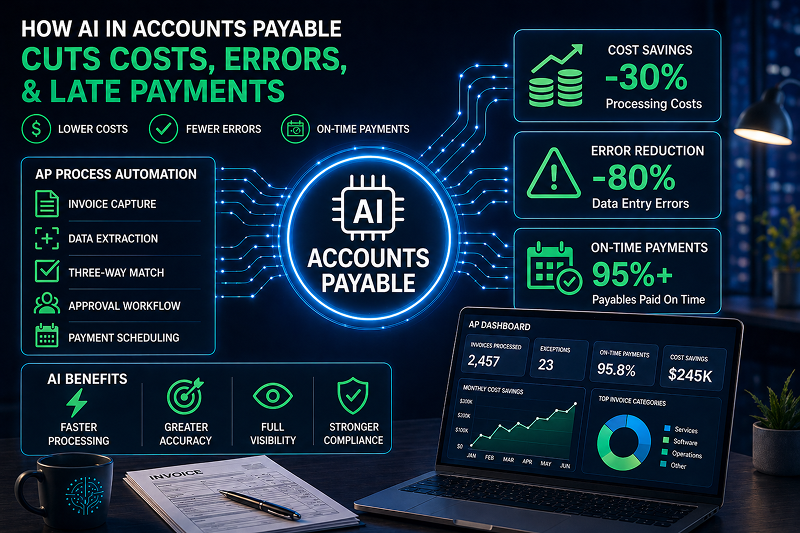
Accounts payable automation ai helps address these challenges by supporting tasks such as invoice capture, categorization, approval routing, exception detection, and payment prioritization. The goal is not to replace finance teams, but to give them better control, cleaner data, and more time to focus on higher-value work.
In this article, we’ll look at how ai powered ap automation works, where it can deliver the most value, the key benefits for AP teams, common use cases, and how to choose AI in accounts payable software that fits your organization’s processes.
What Is AI in Accounts Payable?
AI in accounts payable refers to the use of artificial intelligence, machine learning, and automation to improve how invoices are received, reviewed, approved, matched, and paid. In practical terms, it helps AP teams handle the repetitive parts of invoice processing with more speed and consistency, while still leaving room for human review where judgment is needed.
This can include invoice data capture and extraction, where the system reads key details such as vendor names, invoice numbers, dates, line items, tax amounts, and payment terms. It can also support invoice categorization, suggest GL codes based on previous transactions, and route PO or non-PO invoices to the right approvers. Some systems can flag duplicate invoices, identify unusual payment requests, and recommend payment timing based on due dates, cash flow needs, or early-payment discount opportunities.
The important distinction is that ai in accounts payable software goes beyond basic rule-based automation. Traditional AP automation usually follows fixed instructions: if an invoice is over a certain amount, send it to a specific manager; if a vendor matches a record, apply a preset code. Useful, yes. But limited.
With ap automation machine learning, the system can learn from historical invoice data, recognize patterns, and improve its recommendations over time. For example, ai tools for invoice categorization in accounts payable may become better at identifying which department, project, or expense category an invoice belongs to after seeing similar invoices before. That learning capability is what makes AI especially valuable for modern AP teams.
How AI-Powered AP Automation Works
At a basic level, ai powered ap automation follows the invoice from arrival to payment, removing much of the manual lifting along the way. Not all systems work in exactly the same manner, of course, but the general flow is fairly consistent.
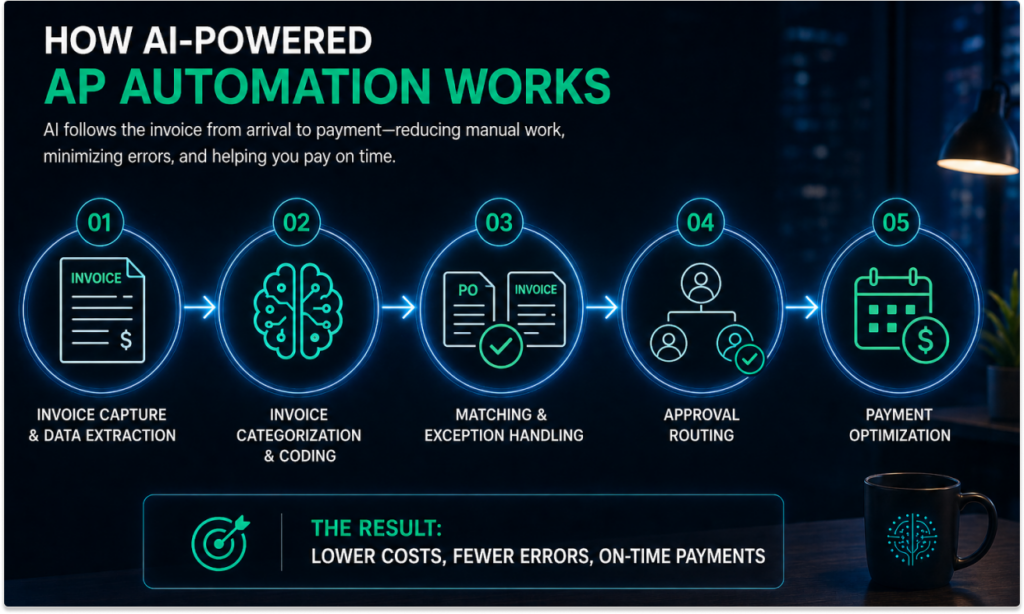
Invoice capture and data extraction
The process usually begins when an invoice arrives by email, PDF, scan, supplier portal, or another digital channel. Instead of someone keying in the details by hand, AI reads the document and extracts the important fields: supplier name, invoice number, PO number, dates, line items, tax, totals, and payment terms. Small thing, big difference.
Invoice categorization and coding
Once the data is captured, ap automation machine learning can help classify the invoice. The system may recommend a vendor record, expense category, cost center, department, or GL code based on similar invoices from the past. This is where ai tools for invoice categorization in accounts payable become especially useful, because AP teams often deal with invoices that are close-but-not-quite-the-same. Consulting fees. Software renewals. Freight charges that somehow never look identical twice.
Matching and exception handling
Next comes matching. For PO-based invoices, AI can support two-way or three-way matching by comparing invoice details against purchase orders and receiving records. If something does not line up—wrong quantity, price difference, missing PO, duplicate invoice number—the system flags it for review rather than letting it quietly drift downstream.
Approval routing
AI can also route invoices to the correct approver based on vendor, amount, department, location, project, or previous approval behavior. In practice, this reduces the “who owns this?” back-and-forth that slows AP teams down.
Payment optimization
Finally, AI can help prioritize payments. It may highlight invoices approaching their due date, identify early payment discounts, or help finance teams plan cash outflows more clearly. The result is a more controlled AP workflow, and, frankly, fewer unpleasant surprises.
Key Benefits of AI in Accounts Payable Automation
The benefits of ai in accounts payable automation are not limited to shaving a few minutes off invoice entry. That helps, certainly. But the bigger value is operational: faster cycles, cleaner data, stronger controls, and fewer payment issues that create unnecessary noise for finance teams.
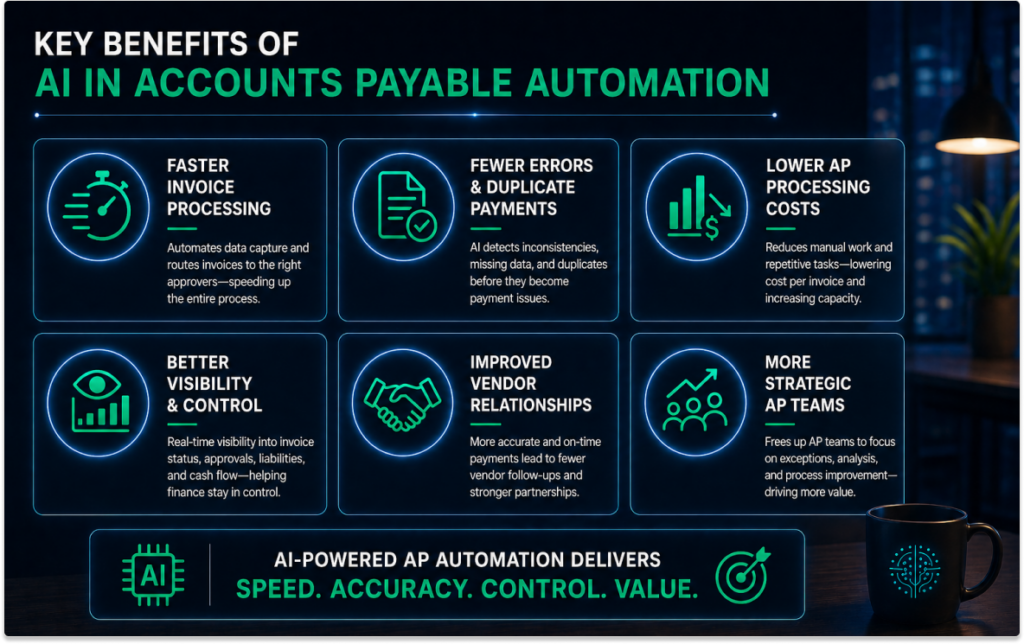
Faster invoice processing
One of the most immediate advantages is speed. AI reduces manual data entry by capturing invoice details automatically and moving invoices into the right workflow sooner. Approvals can also move faster because invoices are routed to the correct person with the right supporting information attached. No hunting. No forwarding chains with “please advise” buried at the bottom.
Fewer errors and duplicate payments
Manual AP work is vulnerable to simple mistakes: a mistyped invoice number, an incorrect total, a missing PO, or a duplicate invoice submitted under a slightly different format. Accounts payable automation ai can help flag inconsistencies, missing fields, duplicate records, and unusual invoice patterns before they become real payment problems.
Lower AP processing costs
Every invoice that requires manual handling has a cost. Someone has to open it, read it, enter it, code it, route it, follow up on it, and sometimes fix it later. AI reduces the time spent on these repetitive tasks, which can lower the cost per invoice and help AP teams handle higher volumes without constantly adding headcount.
Better visibility and control
Finance leaders need to know what has been received, what is pending approval, what is due, and what liabilities are coming down the road. AI-supported AP systems provide clearer visibility into invoice status, bottlenecks, payment timing, and cash flow requirements. That kind of control matters, especially when month-end is looming.
Improved vendor relationships
Late or inaccurate payments can strain supplier relationships quickly. By helping invoices move through the process more reliably, AI supports more accurate payment timing and fewer vendor follow-ups. It is not glamorous work, but vendors notice when payments arrive as expected.
More strategic AP teams
Perhaps the most valuable answer to how can ai improve efficiency in accounts payable is this: it gives skilled AP staff time back. Instead of spending the day on repetitive entry and status chasing, teams can focus on exceptions, vendor communication, reporting, process improvement, and analysis. Better work, better outcomes.
The Role of AI in Reducing Late Payments in Accounts Payable
Late payments rarely happen because one person simply forgot to click “pay.” More often, they are the result of small delays stacking up: an invoice lands in the wrong inbox, an approver is out of office, a PO mismatch sits unresolved, or payment terms are not clearly visible until the deadline is already uncomfortably close.
This is where the role of ai in reducing late payments in accounts payable becomes especially practical. AI in accounts payable helps create a more controlled flow from the moment an invoice arrives. Automatic invoice capture reduces the risk of invoices being lost in email threads or sitting unnoticed in shared mailboxes. Once captured, AI can extract due dates, vendor terms, PO numbers, and payment details, giving AP teams a clearer starting point.
From there, ai powered ap automation can route invoices to the right approver based on vendor, department, amount, or previous behavior. That alone can remove days of needless back-and-forth. And when something does not match—price, quantity, missing receipt, duplicate invoice—the system can flag the exception earlier, before it turns into a last-minute scramble.
AI can also help prioritize work. Invoices nearing due date, invoices with early payment discounts, or invoices from critical vendors can be surfaced first. Add better cash flow visibility to the picture, and finance teams can plan payment runs with less guesswork. Not perfectly, because business is messy. But with fewer blind spots, fewer avoidable delays, and fewer awkward vendor emails.
Common AI Use Cases in Accounts Payable
AI becomes most useful in AP when it is applied to the everyday work that tends to drain time, invite errors, or slow everything down. The best use cases are not abstract. They are the familiar AP pain points, just handled with a sharper set of tools.
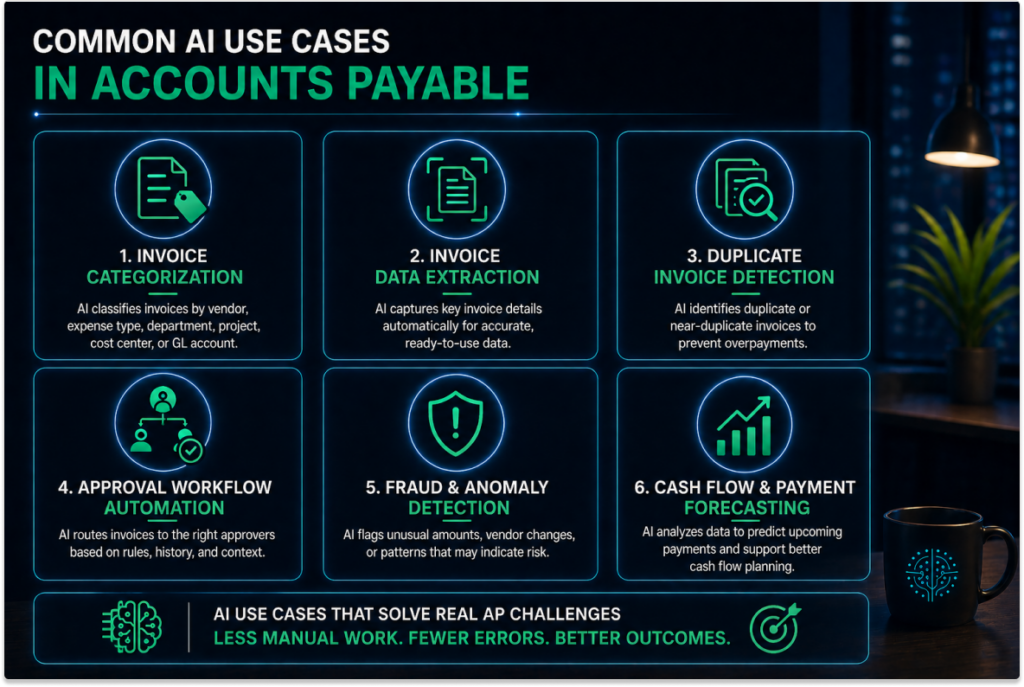
Invoice categorization
One of the most common applications is invoice categorization. AI tools for invoice categorization in accounts payable can classify invoices by vendor, expense type, department, project, cost center, or GL account. Over time, the system can learn from previous coding decisions and recommend where similar invoices should go. This is especially helpful when vendors provide multiple services or when invoices arrive with vague descriptions. “Professional services,” for example, can mean almost anything. Not exactly helpful.
Invoice data extraction
AI can also capture key invoice details automatically, including invoice numbers, dates, line items, tax amounts, totals, PO numbers, and payment terms. In strong ai in accounts payable software, this reduces the need for manual typing and gives AP teams cleaner data to work with from the start.
Duplicate invoice detection
Duplicate payments are one of those issues that seem small until they are not. AI can compare invoice numbers, vendor names, amounts, dates, and payment details to identify duplicates or near-duplicates before money goes out the door.
Approval workflow automation
With ap automation machine learning, approval routing can become more intelligent. The system may recommend or apply routing rules based on prior approvals, invoice value, department, location, or vendor history. Less chasing. Fewer dead ends.
Fraud and anomaly detection
AI can flag unusual invoice amounts, changes to vendor bank details, unexpected payment requests, or invoices that do not match normal patterns. It is not a substitute for financial controls, but it can be a very useful extra set of eyes.
Cash flow and payment forecasting
Finally, AI can help finance teams forecast upcoming AP obligations. By analyzing invoice due dates, payment terms, approval status, and historical payment patterns, it can support more accurate payment planning and better cash flow decisions.
How to Choose AI for Accounts Payable Processes
When evaluating how to choose ai for accounts payable processes, start with a practical question: will this system improve the way your AP team actually works, or will it simply add another platform to babysit? The difference matters. A lot.
Look for strong invoice capture and data accuracy
Good ai in accounts payable software should handle different invoice formats without falling apart: PDFs, scanned documents, email attachments, supplier-generated invoices, and the occasional oddball layout that looks like it was built in 2007 and never touched again. The goal is fewer manual corrections, cleaner data, and less time spent validating basic fields such as invoice number, vendor name, PO number, totals, tax, and payment terms.
Evaluate integration with your ERP or accounting system
Integration is where many AP projects either gain momentum or quietly get stuck. AI powered ap automation should connect with your existing ERP or accounting system rather than forcing finance teams to rebuild everything from scratch. This is one area where ACOM’s approach is especially relevant: ACOM positions its AP automation around modernizing accounts payable without replacing the ERP, including support for IBM i, on-prem, hybrid, and cloud ERP environments.
Check approval workflow flexibility
Every organization has its own approval maze. Amount thresholds, departments, project codes, locations, vendor rules — and then the exceptions to the exceptions. Look for software that can support these realities without endless workarounds. ACOM’s AP workflow automation focuses on reducing manual data entry, minimizing errors, accelerating invoice processing, and integrating with existing systems, which can be valuable for companies that need automation to fit established finance processes rather than bulldoze them.
Prioritize transparency and auditability
Finance teams need to know who approved what, when, why, and what changed along the way. Clear audit trails, approval histories, exception notes, and document records are not “nice extras.” They are the plumbing.
Assess machine learning capabilities
The system should improve over time, especially around coding, categorization, routing, and exception recognition. If recommendations never get better, then it is not really learning; it is just wearing an AI name badge.
Consider security, compliance, and reporting
AP systems handle sensitive vendor data, bank details, invoices, and payment records, so security controls matter. So do dashboards that show cycle times, bottlenecks, invoice status, payment timing, and AP performance. Because in the end, choosing AI for AP is not about chasing novelty. It is about giving finance a calmer, cleaner, more reliable way to work.
AI in Accounts Payable vs. Traditional AP Automation
Traditional AP automation still has value. It can move invoices through preset workflows, reduce paper handling, and enforce basic approval rules. For many teams, that alone is a meaningful step forward.
But accounts payable automation ai goes further. Instead of simply following fixed instructions, AI can learn from historical invoice activity, recognize patterns, and recommend better actions over time. That is the real shift: from moving invoices along a track to helping decide what should happen next.
| Traditional AP Automation | AI-Powered AP Automation |
|---|---|
| Uses rule-based routing | Supports intelligent routing based on vendor, amount, department, or past behavior |
| Relies on manual coding rules | Provides AI coding suggestions using historical invoice data |
| Runs basic duplicate checks | Flags duplicates, near-duplicates, and unusual invoice patterns |
| Uses static workflows | Improves with ap automation machine learning over time |
| Automates repetitive steps | Helps optimize the overall AP process |
In simple terms, traditional automation helps AP teams do the same work faster. AI powered ap automation can help them do the work faster, with better judgment, cleaner data, and fewer blind spots. It is not magic, and it still needs oversight. But it is a more flexible model for AP teams dealing with growing invoice volume, tighter deadlines, and more complex payment decisions.
Conclusion: The Future of Accounts Payable Is AI-Assisted
The future of AP is not about removing people from the process. It is about removing the friction that keeps skilled finance teams stuck in repetitive, low-value work. That is where ai in accounts payable is becoming genuinely useful.
By improving invoice capture, coding, approvals, matching, exception handling, and payment timing, AI can help teams process invoices faster, reduce errors, avoid late payments, and gain better control over AP operations. These are not small wins. They affect cash flow, vendor relationships, audit readiness, and the day-to-day sanity of the finance department.
The benefits of ai in accounts payable automation become clearest when AP teams spend less time chasing information and more time managing outcomes. So, how can ai improve efficiency in accounts payable? By doing more than digitizing invoices. The best AI-powered AP automation tools help teams make smarter, faster, and more accurate decisions.