Invoices rarely arrive in one clean format.
Some come as PDFs. Some arrive by email. Others are scanned from paper, uploaded through portals, or attached to purchase order records.
For accounts payable teams, this creates a daily challenge. Every invoice needs to be received, reviewed, entered, matched, approved, and paid.
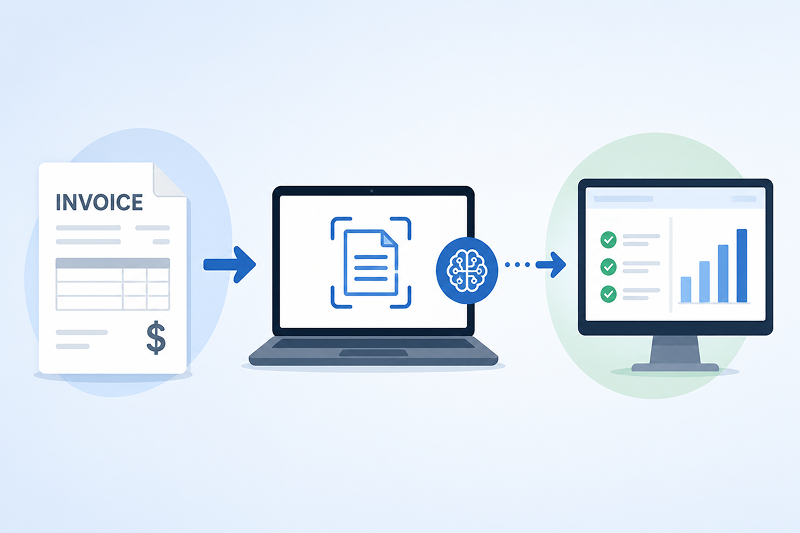
Invoice capture software helps simplify the first part of that process. It turns invoice documents into usable data, so AP teams do not have to key in every field by hand.
But invoice capture is not just about reading invoices. The real value comes when captured data can be validated, matched, and sent into the systems your team already uses.
What Is Invoice Capture Software?
Invoice capture software extracts key information from invoices.
This can include the vendor name, invoice number, invoice date, due date, purchase order number, line items, taxes, freight, payment terms, and total amount.
The goal is simple. Instead of having an AP clerk manually type this information into an ERP or accounting system, the software captures the data automatically.
Modern invoice data capture software often uses OCR, AI, or both. OCR reads the text on the invoice. AI helps understand what that text means, even when vendors use different invoice layouts.
This matters because no two vendors format invoices the same way.
One vendor may place the invoice number at the top right. Another may include it in the body of the document. A third may use a completely different label.
Good invoice capture solutions help AP teams handle this variation without building a new template for every vendor.
Why Manual Invoice Capture Slows AP Down
Manual invoice capture takes time.
Even a simple invoice may require someone to open the document, find the vendor, check the invoice number, confirm the amount, review the PO, and enter everything into the system.
That may only take a few minutes per invoice. But across hundreds or thousands of invoices each month, the time adds up quickly.
Manual entry also increases the chance of errors.
A mistyped invoice number can make an invoice harder to find later. An incorrect total can delay approval. A wrong PO number can send an invoice to the wrong person or create a matching issue.
These problems are not just administrative.
They can lead to late payments, duplicate payments, missed early-payment discounts, and strained vendor relationships. They also make it harder for finance teams to see what is waiting for approval and what still needs attention.
How Invoice Data Capture Works
Invoice data capture usually starts when an invoice enters the AP process.
That invoice may be scanned, emailed, uploaded, or received through another system. The software reads the document and identifies the important fields.
From there, the system extracts the data and turns it into a structured format.
For example, the software may read a PDF invoice and capture the vendor name, invoice date, PO number, item descriptions, quantities, unit prices, and invoice total.
The next step is validation.
The system may compare captured data against vendor records, purchase orders, receipt data, tax rules, or company-specific approval rules. If the data looks correct, the invoice can continue through the workflow.
If something does not match, the invoice can be flagged for review.
This is where automated invoice capture software becomes more useful than simple scanning. It does not just create a digital copy. It helps move the invoice toward the next step in the AP process.
Invoice Scanning and Data Capture Are Not the Same Thing
Invoice scanning and data capture are often used together, but they are not the same.
Scanning turns a paper invoice into a digital image. This is useful because it removes the need to store and move paper.
But scanning alone does not solve the data entry problem.
Someone may still need to open the scanned file, read the invoice, and type the information into another system.
Invoice data capture goes further.
It reads the invoice and extracts the fields AP teams need. In more advanced workflows, it also helps validate that information before it moves into the ERP or accounting system.
In simple terms, scanning creates a digital document. Invoice capture creates usable AP data.
What to Look for in the Best Invoice Capture Software
The best invoice capture software should do more than read text.
It should help reduce manual work while improving accuracy and control.
A good place to start is data accuracy. If your team has to correct every captured invoice, the software may only move the work from one place to another.
You should also look at how the system handles different invoice formats.
Some tools work well only when invoice layouts are predictable. Others use AI invoice data capture to recognize fields across many vendor formats.
This is especially important for companies with a large supplier base.
ERP integration is another key factor. Captured invoice data should flow into the system your team already uses, whether that is an ERP, accounting system, or AP workflow platform.
Exception handling also matters.
The software should make it easy to identify invoices that need review. AP teams should be able to focus on the exceptions instead of checking every invoice manually.
Why AI Invoice Data Capture Is Becoming More Important
AI is changing how invoice capture works.
Older systems often depended on rigid templates. If a vendor changed its invoice layout, the capture process could break or require manual adjustment.
AI invoice data capture is designed to be more flexible.
It can help identify fields based on context, not just location. For example, it can learn that “amount due,” “balance due,” and “invoice total” may refer to the same type of data.
AI can also help with more complex AP work.
This includes coding suggestions, PO matching, tolerance checks, and exception routing. These steps help AP teams move from simple data entry toward more automated invoice processing.
Still, AI should not operate without controls.
The strongest use cases combine AI with business rules, approval workflows, audit trails, and human review for exceptions.
From Invoice Capture to Invoice Matching
Invoice capture is often the first step. Matching is where the process becomes more valuable.
For many companies, an invoice must be compared against a purchase order. In some cases, it also needs to be checked against receipt data.
This is known as 2-way or 3-way matching.
In a 2-way match, the invoice is compared to the purchase order. In a 3-way match, the invoice is compared to both the purchase order and the goods receipt.
This helps answer important questions.
Did the vendor bill the correct amount? Were the right quantities delivered? Are the prices within approved tolerances? Does the invoice match what was ordered and received?
When this process is manual, AP teams spend a lot of time reviewing details line by line.
When invoice capture is connected to matching, much of that review can be automated. The system can approve clean matches and flag only the invoices that need attention.
A Practical Example of Automated Invoice Capture
Consider a manufacturer that receives 1,000 invoices each month.
Each invoice may include line items, freight charges, taxes, discounts, and PO references. Some invoices match the purchase order exactly. Others have small differences.
Without automation, AP staff may need to review each invoice manually.
They check the invoice against the PO. They confirm quantities and prices. They look for differences that fall outside company rules.
Automated invoice capture software can reduce this effort.
The system captures the invoice data, checks it against the PO, applies tolerance rules, and flags exceptions. Clean invoices move forward faster. Problem invoices are still reviewed by a person.
This does not remove control from AP.
It helps AP spend less time on routine review and more time resolving the invoices that actually need judgment.
Where AutoLedger Fits into the Conversation
ACOM’s AutoLedger is an example of how invoice capture is evolving.
It is being developed to use AI, OCR, and rules-based matching to extract, compare, and reconcile invoice, PO, and receipt data. The focus is on helping AP teams reduce manual 2-way and 3-way matching work.
This is especially relevant for organizations that process high invoice volumes and rely on IBM i or AS400 environments.
In that context, invoice capture is not a standalone task. It becomes part of a larger AP workflow that includes document extraction, matching logic, exception review, and ERP integration.
That is the direction many AP teams are moving toward.
They are not only asking, “Can we capture invoice data?” They are asking, “Can we trust the data enough to move faster?”
Benefits of Automated Invoice Capture Software
Automated invoice capture software can help AP teams in several practical ways.
It can reduce manual data entry. It can improve invoice visibility. It can help invoices move through approval faster.
It can also reduce the risk of common AP problems.
These include duplicate payments, missed discounts, delayed approvals, and errors caused by manual keying.
For finance leaders, the value is not only speed. It is control.
When invoice data is captured, validated, and tracked, teams have a clearer view of what is happening. They can see where invoices are stuck and which exceptions need attention.
For AP staff, the benefit is also practical.
Less time spent typing invoice fields means more time available for vendor questions, exception resolution, and higher-value work.
Final Thoughts
Invoice capture software helps AP teams move away from manual data entry.
But the real value goes beyond capture. It comes from turning invoice documents into accurate, validated data that can support matching, approvals, payments, and reporting.
For some teams, the first step may be replacing paper with digital invoice capture. For others, the next step is AI invoice data capture connected to PO matching and exception workflows.
The right approach depends on invoice volume, vendor complexity, ERP requirements, and the level of control your team needs.
The goal is not to remove people from AP.
The goal is to remove repetitive work, reduce avoidable errors, and give AP teams better information to make faster decisions.