Somewhere between the third invoice and the fifth browser tab, things start to blur a little. Numbers look the same. Or… almost the same. And that tiny difference? Yeah, that’s the kind that causes headaches later.
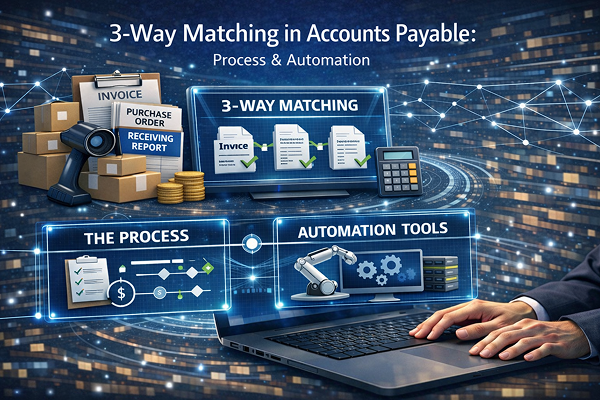
Accounts payable teams know this rhythm all too well. Manual invoice verification isn’t just tedious—it’s relentless. You’re flipping between purchase orders, invoices, receiving reports, trying to make sure everything lines up. And technically, that’s 3-way matching in accounts payable: comparing what was ordered, what was received, and what’s being billed. Simple idea. Messy reality.
Because when it’s done by hand, things slip. They just do. A missed discrepancy here, a duplicate payment there, maybe a discount opportunity that quietly expires while no one’s looking. It adds up—time, money, frustration.
And honestly, it’s not sustainable anymore.
That’s why more companies are shifting—some cautiously, others with urgency—toward automated 3-way invoice matching. Not because it’s flashy. Because it works. Faster approvals, fewer errors, and (finally) a bit of breathing room for AP teams who’ve been stuck in the weeds for far too long.
What Is 3-Way Matching in Accounts Payable?
Alright—let’s slow this down for a second, because people toss the term around like everyone just gets it. Not always the case.
3 way match accounting is essentially a verification checkpoint. A safeguard, really. Before any money leaves the building, three separate documents have to agree with each other—no funny business, no loose ends.
Here’s what’s involved:
- Purchase Order (PO): what your company intended to buy
- Invoice: what the vendor says you owe
- Receiving Report: what you actually received
Now, in a perfect world (which, let’s be honest, doesn’t exist), these three line up neatly. Same quantities. Same prices. Same terms. Done.
But reality? A little messier.
For a proper 3 way match, those details—quantity, price, payment terms—have to match across all three documents. If even one piece feels off, the whole thing gets flagged. That’s the core of ap 3 way match processes: verify first, pay later.
And when done right—whether manually or through 3 way invoice matching automation—it acts like a financial filter, catching errors before they turn into expensive mistakes.
The 3-Way Matching Process (Step-by-Step)
If you’ve ever watched someone actually do this in real time, you’ll notice—it’s not one clean motion. It’s more like a series of small checks, pauses, double-backs. The 3 way matching process unfolds in stages, whether people realize it or not.
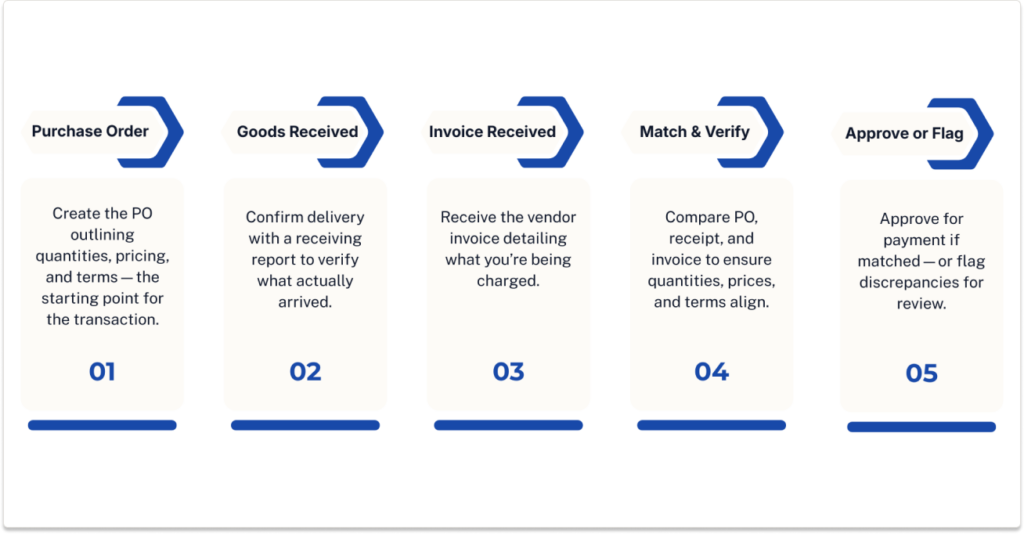
Step 1: Purchase Order Creation
It starts upstream. A purchase order is created—basically a formal “here’s what we’re buying” document. It lists quantities, agreed prices, terms. Think of it as the original promise. If this step is sloppy, everything downstream gets… shaky.
Step 2: Goods or Services Received
Next, something arrives. Physical goods, completed services, whatever was ordered. A receiving report gets logged to confirm what actually showed up. And yes, sometimes it’s not quite what was expected. That’s where things begin to wobble.
Step 3: Invoice Received
Then comes the invoice. The vendor’s version of events. “Here’s what you owe us.” Ideally, it mirrors the PO and receiving report. Ideally.
Step 4: Matching & Validation
This is the heart of it. Someone—often manually—compares all three documents. Line by line. Quantity, price, terms. It sounds quick, but it isn’t always. In fact, it can take 5–10 minutes per invoice, which doesn’t seem terrible until you’re dealing with hundreds… or thousands. That’s when it snowballs into weeks of work.
Step 5: Approval or Exception Handling
Finally, a decision. If everything aligns, the invoice gets approved for payment. If not, it’s flagged—kicked back for review, clarification, sometimes a frustrating email chain that goes on longer than it should.
And that’s the process. Straightforward on paper. A bit of a grind in practice.
2-Way vs 3-Way Matching in Accounts Payable
Here’s where things get a little… nuanced. Not complicated, exactly—but easy to oversimplify if you’re not paying attention.
2 way matching in accounts payable is the lighter version of the process. You’re comparing just two documents: the purchase order and the invoice. That’s it. If they match, payment moves forward. Quick. Efficient. Sometimes a little too trusting.
Now, bring in the third document—the receiving report—and you’ve got three way matching. Or, as some folks casually say, the difference between “good enough” and “let’s be absolutely sure.”
So, in plain terms:
- 2-way: PO + Invoice
- 3-way: PO + Invoice + Receipt
When does each make sense? Well, two way matching and three way matching aren’t interchangeable—they serve different scenarios.
2-way works fine for services or straightforward purchases where there’s not much ambiguity. But for inventory-heavy businesses, manufacturing, or anything with higher financial risk, 3-way matching is the safer bet.
Skip that third check, and things can get… dicey. Overpayments sneak in. Fraud risks creep up. Compliance? Let’s just say auditors tend to notice.
Common Challenges with Manual 3-Way Matching
Let’s be honest—on paper, 3-way matching looks clean. Logical. Almost elegant. But once humans get involved (and spreadsheets, and inboxes, and Friday afternoons), things start to fray a bit.
Manual data entry & reconciliation
This is the big one. Every invoice has to be keyed in, checked, cross-referenced. Again and again.
Impact: It’s not just tedious—it’s expensive. Processing costs can quietly climb to $12–$30 per invoice, which… doesn’t sound outrageous until you multiply it across thousands.
Mismatched data between documents
Maybe the quantities are off. Maybe the price changed. Maybe someone updated the PO and forgot to tell anyone (it happens).
Impact: Approvals stall. Emails fly back and forth. Suppliers get impatient. Suddenly a simple payment turns into a mini project.
High invoice volumes
Here’s where it really starts to hurt. Ten invoices? Fine. A hundred? Manageable. A thousand? Different story.
Impact: Entire workweeks—gone. Just… gone, spent matching documents line by line.
Human error
And look, nobody likes to admit this part, but it’s real. People get tired. Distracted.
Impact: Duplicate payments slip through. Compliance risks creep in. Small mistakes, big consequences.
Benefits of 3-Way Matching in AP
For all the frustration it can cause when done manually, 3-way matching—when it’s working properly—is actually a bit of a quiet hero in accounts payable. Not flashy. Not exciting. But incredibly important.
First off, it prevents overpayments and fraud. That extra layer of verification—the receiving report—acts like a second set of eyes. Or maybe a third. Either way, it makes it much harder for incorrect or inflated invoices to slip through unnoticed.
Then there’s financial accuracy. When your numbers line up across every document, your books tend to follow suit. Fewer discrepancies, fewer awkward end-of-month surprises.
It also strengthens audit readiness, which—let’s face it—is something most teams only think about when it’s suddenly urgent. With a proper matching process in place, there’s a clear trail. Everything’s documented. Traceable.
And suppliers? They notice too. Consistent, accurate payments build trust, even if no one explicitly says it.
But maybe the biggest shift is control. Better visibility. Smarter timing. Cash flow becomes something you manage, not something that manages you.
The outcomes speak for themselves: fewer errors, faster approvals, and—yes—real, measurable cost savings.
What Is Automated 3-Way Invoice Matching?
At some point, companies hit a wall and think—there’s got to be a better way than this. That’s usually where automated 3 way invoice matching enters the conversation.
In simple terms, it’s the same 3-way matching process… just without the constant human back-and-forth. No endless tab switching. No late-afternoon number fatigue.
Here’s how it typically works.
First, OCR (optical character recognition) pulls data straight from incoming invoices—PDFs, scans, emails, you name it. No manual typing. That alone feels like a small miracle.
Then, behind the scenes, AI steps in. It compares that extracted invoice data against the purchase order and the receiving report. Quantities, pricing, terms—it checks everything, and it does it fast. Like, really fast.
But it doesn’t stop there. The system applies rules-based validation—tolerances for price differences, acceptable quantity variances, predefined business logic. Every company’s rules are a little different, which is kind of the point.
And here’s the part people tend to love:
Exception handling.
Instead of reviewing every single invoice, your team only looks at the ones that don’t match. The outliers. The problem cases. Everything else? It flows through automatically.
Less noise. More control. Honestly, it just makes sense.
How Automation Transforms the 3-Way Matching Process
Let’s call it what it is—manual 3-way matching is a grind. It eats time. It drains attention. And, over weeks and months, it quietly chips away at productivity in ways most teams don’t even measure.
Problem:
Manual matching consumes time and resources. A lot of both. People spend hours comparing documents that, frankly, a machine could check in seconds.
Impact:
The consequences stack up faster than you’d expect. Processing slows to a crawl. Early-payment discounts—those easy wins—get missed because approvals take too long. Labor costs creep higher, not dramatically at first, but steadily… like a slow leak no one notices until it’s a problem.
And then there’s the frustration. Hard to quantify, but definitely there.
ACOM Solution:
This is where ACOM’s AI-driven approach—think Auto Ledger—flips the script. Instead of relying on manual checks, the system automatically matches invoice, PO, and receipt data in real time. It learns patterns, applies business rules, and handles the heavy lifting without constant oversight.
Results:
The shift is noticeable. Processing speeds jump—up to 75% faster. Accuracy improves to around 99.8%, which is… honestly hard to argue with. And manual validation? Cut by 80–90%.
Less chasing. Less guessing. More control.
When Should You Use 3-Way Matching?
Not every invoice needs the full three-document interrogation. That’s probably worth saying upfront.
But in the right environments? 3-way matching isn’t just helpful—it’s essential.
It really shines in industries where things move fast and margins matter. Think manufacturing, where raw materials, components, and finished goods are constantly flowing in and out. Or distribution and logistics, where a single mismatch in quantity or pricing can ripple across shipments, invoices, and inventory systems before anyone catches it.
And then there are high-volume AP environments—the kind where hundreds (or thousands) of invoices come through every month. In those cases, skipping verification is… risky, to put it mildly. The more volume you have, the more opportunities for something to go sideways.
Now, on the flip side, service-based invoices are a different story. If there’s no physical delivery—no receiving report to compare against—then 3-way matching can feel like overkill. Two-way matching usually does the job just fine.
So it’s not about using it everywhere. It’s about using it where it actually protects you.
Conclusion: From Manual Matching to Intelligent Automation
If there’s one thing that’s become pretty clear, it’s this: 3 way matching in accounts payable isn’t optional anymore—it’s foundational. It’s the checkpoint that keeps payments accurate, prevents costly mistakes, and gives finance teams a fighting chance at staying in control.
But—and this is the part many teams wrestle with—doing it manually just doesn’t hold up anymore. Not at scale. Not with today’s invoice volumes. What once worked fine with a few dozen invoices now turns into a bottleneck with a few hundred. Or a few thousand. The math simply stops working.
So companies adapt. Or they fall behind.
And increasingly, adaptation looks like automation. Not as a luxury, but as a necessity. Because when you shift from manual matching to intelligent systems, something changes—you move faster, you make fewer errors, and your team can finally focus on work that actually moves the business forward.
That’s really the takeaway here.
Automation isn’t just about efficiency (though it absolutely delivers that). It’s about accuracy. Control. Growth. And maybe—just maybe—giving your AP team a break from the constant grind.