Processing invoices has never been a favorite task for finance teams. It involves repetitive data entry, multiple approval steps, and constant follow-up to keep payments moving.
As invoice volumes grow, these manual processes become harder to manage. Even small errors can lead to duplicate payments, delayed approvals, or missed early-payment discounts.
This is why more organizations are turning to AI invoice processing. Instead of relying on employees to manually capture and verify invoice data, artificial intelligence automates much of the work while improving accuracy and visibility.
In this guide, we’ll explain how AI invoice processing works, where it delivers the greatest value, and what to look for when evaluating modern AI invoice processing software.
What Is AI Invoice Processing?
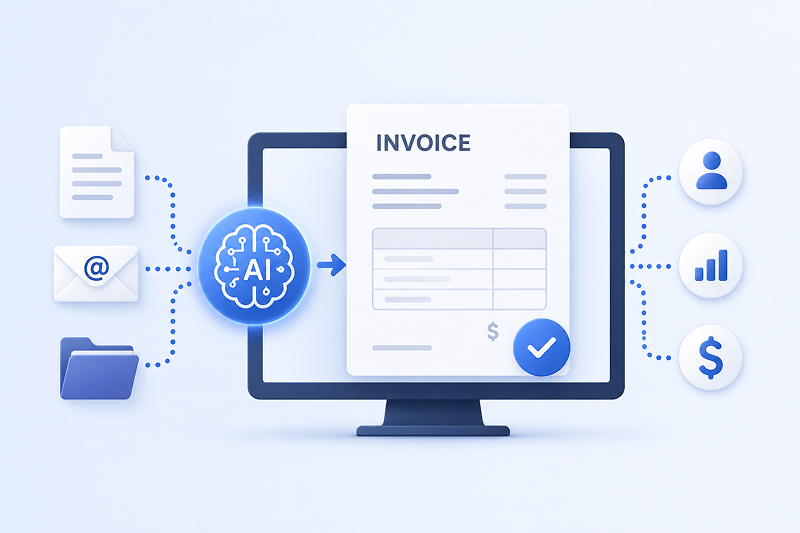
AI invoice processing uses artificial intelligence to capture, understand, validate, and route invoices without relying on manual data entry.
Unlike traditional systems that simply read text, AI can recognize different invoice formats, identify key information, and apply business rules automatically. As more invoices are processed, the system continues to improve by learning from corrections and exceptions.
Modern AI invoice processing software typically combines several technologies, including optical character recognition (OCR), machine learning, and workflow automation.
The goal isn’t to eliminate human involvement entirely. Instead, it reduces repetitive work so AP teams can focus on reviewing exceptions and managing supplier relationships.
How AI Invoice Processing Works
Although every platform works a little differently, most AI invoice automation follows a similar process.
1. Capture invoices from multiple sources
Invoices arrive in many formats. They may come through email, supplier portals, scanned paper documents, or PDFs.
Instead of manually downloading and organizing each file, AI automatically captures invoices as they arrive.
2. Extract invoice data
This is where AI invoice data capture becomes valuable.
The software identifies important fields such as vendor name, invoice number, purchase order, payment terms, dates, taxes, and line-item details. Unlike template-based OCR, AI adapts to different invoice layouts without requiring manual configuration for every supplier.
3. Validate the information
Once the data is extracted, the system checks it against predefined business rules.
It can compare invoices with purchase orders, detect duplicate invoices, verify totals, and flag missing information before the invoice moves forward.
4. Route invoices for approval
Invoices are automatically sent to the appropriate approvers based on company policies.
This reduces delays caused by emails, paper folders, or manual handoffs while giving finance teams better visibility into every invoice’s status.
5. Post approved invoices to the ERP
After approval, invoice information is transferred into the organization’s ERP or accounting system.
This eliminates another round of manual data entry and reduces the chance of errors.
Common Challenges AI Invoice Automation Solves
Many organizations don’t realize how much time their AP team spends on repetitive administrative work until they begin measuring it.
AI invoice automation addresses several of the biggest challenges facing finance departments today.
Manual data entry
Typing invoice information into accounting systems is slow and repetitive.
AI extracts the information automatically, allowing staff to spend more time reviewing exceptions instead of entering data.
Processing delays
Invoices often wait days for someone to review or approve them.
Automated workflows help move invoices to the right people faster while keeping everyone informed of their status.
Data entry errors
Small mistakes can create expensive problems.
Incorrect invoice numbers, duplicate payments, or inaccurate coding may require significant time to investigate and correct. AI helps reduce these errors by validating information before processing continues.
Poor visibility
Many AP teams struggle to answer simple questions like:
- Has this invoice been approved?
- Who is reviewing it?
- When will it be paid?
AI-powered workflows provide real-time visibility throughout the entire approval process.
AI Invoice Processing Software vs. Traditional OCR
Many people assume OCR and AI are the same thing. They are not.
Traditional OCR focuses on reading text from documents. It converts printed information into digital text but often struggles when invoice layouts vary between suppliers.
Modern AI invoice processing software goes much further.
Instead of simply recognizing characters, AI understands the structure of invoices, identifies relationships between fields, validates extracted information, and improves over time through machine learning.
For example, if a supplier changes its invoice format, traditional OCR may require new templates.
AI invoice processing can often recognize the new layout automatically with little or no manual adjustment.
That flexibility makes AI particularly valuable for organizations working with hundreds or even thousands of suppliers.
What to Look for in AI Billing Software
Not every solution offers the same capabilities. Before investing in AI billing software, it’s worth evaluating several key areas.
Accurate AI invoice data capture
The software should consistently extract information from invoices regardless of supplier format or document type.
ERP integration
Look for software that integrates with your existing ERP or accounting platform rather than requiring manual imports.
Intelligent approval workflows
Approval rules should automatically route invoices based on amount, department, location, or other business criteria.
Exception management
The best systems don’t just automate successful invoices.
They also make it easy to identify exceptions, resolve issues, and keep processing moving.
Reporting and audit history
Finance teams benefit from complete visibility into invoice status, approval history, and processing metrics.
This makes audits easier while providing valuable operational insights.
Where AI Invoice Processing Delivers the Greatest Value
Organizations processing only a handful of invoices each month may not notice a dramatic difference.
However, companies managing hundreds or thousands of invoices often see meaningful improvements.
Manufacturing, retail, and logistics organizations frequently deal with large invoice volumes and multiple suppliers. AI can reduce administrative work while improving consistency across these complex workflows.
The biggest benefit isn’t simply faster processing.
It’s allowing finance professionals to spend less time entering data and more time analyzing spending, managing suppliers, and improving financial operations.
Final Thoughts
Manual invoice processing consumes valuable time that finance teams could spend on higher-value work.
AI invoice processing helps automate repetitive tasks such as data capture, validation, routing, and approval while improving accuracy throughout the process.
As organizations continue modernizing their accounts payable operations, AI invoice automation is becoming less of a future investment and more of a practical tool for improving efficiency, reducing errors, and gaining better visibility into every invoice.