
Most businesses don’t realize they’ve got a data problem until something breaks. An order goes missing. An invoice shows up wrong. Someone, somewhere, is retyping the same numbers for the third time that day and quietly losing their mind over it.
That’s the reality of modern operations, even now.
We live in a world where everything is supposed to be instant—messages, payments, same-day delivery (thanks, Amazon)—yet behind the scenes, a surprising number of companies are still pushing data around like it’s 1998. Manual entry. Copy-paste gymnastics. Systems that don’t quite “talk” to each other unless someone forces them to.
And that’s where things start to wobble.
Errors creep in. Small ones at first. Then delays follow. Then frustrated partners, missed deadlines, and—if we’re being honest—money quietly slipping through the cracks. It’s not dramatic. It’s just… inefficient. Painfully so.
EDI implementation steps in here—not as some flashy tech buzzword, but as a kind of behind-the-scenes fixer. It replaces the tedious back-and-forth with automated, structured data exchange. No retyping. No guesswork.
The payoff? Faster transactions. Cleaner data. Lower costs.
Nothing glamorous. Just smoother business—which, these days, is everything.
What Is EDI Implementation?
Alright, let’s slow this down for a second—because what is EDI implementation, really? It sounds technical, maybe even a bit intimidating, but it’s not as mysterious as it gets made out to be.
At its core, EDI implementation is simply the process of setting up a system that allows businesses to exchange data electronically—cleanly, consistently, and without human interference. Think invoices, purchase orders, shipping notices—all moving from one system to another without someone retyping a single line. That alone is a bit of a relief, right?
But it’s not just flipping a switch.
There’s some groundwork involved. You’ve got software to configure, data fields to align (that’s the mapping piece), and trading partners to bring into the fold—each with their own quirks, formats, and expectations. It can feel a little like translating between multiple languages at once… because, well, it kind of is.
Once it’s up and running, though, things change. Manual processes start to disappear. Errors drop off—noticeably. Compliance gets easier to manage, not harder.
And maybe the biggest shift? Speed. What used to take days—documents bouncing back and forth—can now happen in minutes. Almost instantly.
EDI Implementation Challenges & Issues
Here’s the part nobody really advertises.
EDI sounds great on paper—automation, speed, fewer headaches—but the road to getting there? It can be… bumpy. Sometimes more than bumpy. And most of the common EDI implementation challenges don’t show up until you’re already knee-deep in the process, wondering why something that seemed straightforward suddenly feels like assembling IKEA furniture without instructions.
First off, systems don’t always play nice. Your ERP speaks one language, your WMS another, your CRM… well, it’s doing its own thing entirely. Getting them to communicate smoothly can feel like refereeing a conversation where no one agrees on the vocabulary.
Then there’s manual data re-entry. Ironically, it often sticks around longer than expected. People copy, paste, tweak—introducing tiny errors that snowball into delays. And those delays? They ripple outward.
Trading partners add another layer of complexity. Each one has different requirements, formats, rules. Some are strict. Some are… let’s say “flexible.” Keeping up with all of that can get messy fast.
And don’t even get me started on data mapping inconsistencies. One mismatched field—just one—and suddenly documents fail, transactions stall, and nobody’s quite sure why.
The real kicker, though, is visibility. Or lack of it. Without real-time insight, you’re essentially flying blind, reacting to problems after they’ve already caused damage.
What does all this lead to? Slower order-to-cash cycles. Chargebacks. Compliance risks that sneak up on you. Higher labor costs (because someone has to fix everything). And yeah—missed revenue opportunities. The kind you don’t always notice until later.
Here’s the uncomfortable truth: a lot of these EDI implementation issues aren’t really about EDI itself. They stem from outdated, rigid tools that weren’t built for today’s pace.
Modern platforms flip that script. Automation. Real-time integration. Systems that actually talk to each other without constant babysitting.
And suddenly—it’s not so painful anymore.
EDI Implementation Project Plan
If you’ve ever tried to implement anything technical without a plan, you already know how that story ends. Chaos. Rework. Someone muttering, “we should’ve mapped this out first.”
An EDI implementation project plan isn’t just helpful—it’s survival gear. And honestly? It doesn’t need to be overly complicated. Just structured enough to keep things from going sideways.
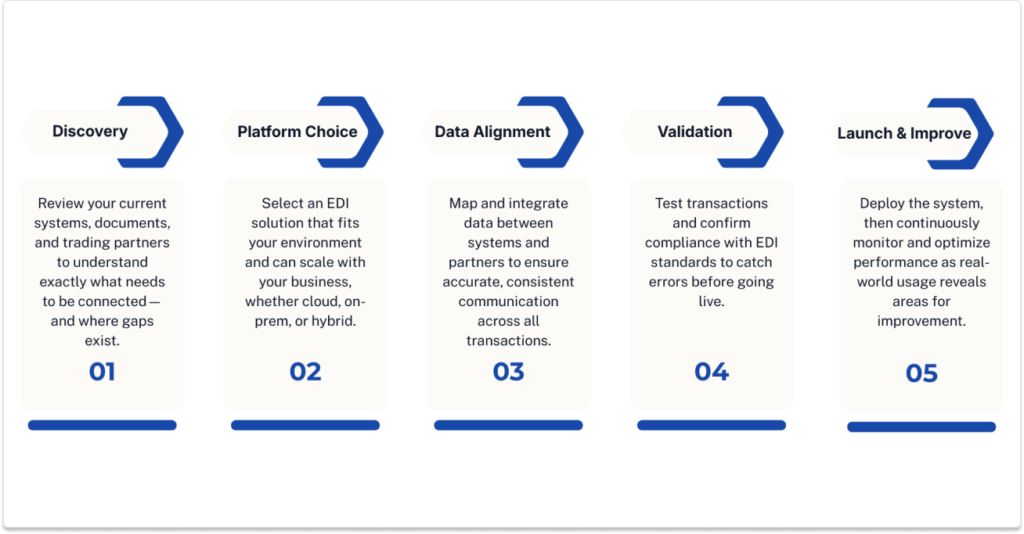
1. Assessment & Planning
This is where you pause—take a breath—and actually look at what you’re working with.
What systems are in play? ERP, WMS, CRM? What documents are you exchanging? Who are your trading partners?
It sounds basic. It is basic. And yet, this step gets rushed more often than it should. Which is… a mistake.
2. Software Selection
Now comes the big choice. Cloud? On-prem? Hybrid?
There’s no perfect answer here, only the right answer for your environment. The key thing—don’t box yourself in. Pick something that scales with you, not something you’ll outgrow by next quarter.
3. Data Mapping & Integration
This is where things get a little gritty.
You’re aligning your internal data with your partners’ formats. Field by field. Value by value. It’s detailed work, sometimes frustrating, occasionally confusing—but absolutely essential.
One mismatch can throw everything off. Just one.
4. Testing & Validation
Here’s where you find out what actually works.
Standards like X12 and EDIFACT aren’t optional—they’re the rules of the game. So you test transactions, validate formats, fix errors… and then test again. It’s repetitive, sure, but skipping steps here usually comes back to bite you later.
5. Deployment & Optimization
Go live. Finally.
But don’t get too comfortable. The first launch is rarely perfect. You monitor, adjust, fine-tune—because real-world usage always reveals things you didn’t catch earlier. Always.
EDI Implementation Checklist
Let’s be honest—when you’re in the middle of an EDI project, things can get… scattered. Notes everywhere, decisions half-made, someone asking, “Did we test that yet?”
That’s where a simple EDI implementation checklist earns its keep. Not glamorous. Just practical. And surprisingly helpful when things start moving fast.
Here’s a quick, no-nonsense reference you can actually use:
- Define your business goals and KPIs
(What does success look like—faster processing? fewer errors? both?) - Audit your existing systems
Take inventory before you start plugging things in blindly - Select your EDI standards
X12, EDIFACT, XML—depends on your partners and industry - Choose your integration method
API, flat file, direct database… there’s more than one way to connect the dots - Map your data fields
This part takes patience. No shortcuts here, unfortunately - Onboard your trading partners
And yes, each one might need slightly different handling - Test your transactions
Then test again. (You’ll thank yourself later) - Set up monitoring and reporting
Because once you’re live, visibility becomes everything
You don’t need to memorize all this. Just keep it nearby.
It’s the kind of checklist that quietly saves you from headaches you didn’t even see coming.
EDI Software Implementation: What to Look For
Choosing the right platform for EDI software implementation—well, it’s a bit like buying a car. Everything looks good in the showroom. Then you drive it for a week and realize… something’s off.
So yeah, it pays to look under the hood.
What Actually Matters
First, flexibility. You want any-to-any data translation—EDI, XML, APIs, flat files, whatever your partners throw at you. Because they will throw different formats at you. No question.
Then there’s speed. Real-time processing isn’t just a “nice feature” anymore—it’s kind of the whole point. If your system relies on batch processing, you’re basically signing up for delays you don’t need.
Automated partner onboarding? Huge. Otherwise, every new partner becomes a mini project. And nobody has time for that.
Error handling is another one people underestimate. Good systems don’t just reject bad data—they isolate it, flag it, let you fix it without bringing everything to a halt. That’s what exception-based handling does.
And of course, audit trails. Compliance isn’t optional, especially if you’re dealing with regulated industries. You need visibility—who sent what, when, and why.
What You Actually Get Out of It
When it’s done right, the impact is noticeable. Fewer errors—often dramatically fewer. Teams move faster. Systems scale without constant babysitting.
Modern platforms like EZConnect take it further—eliminating manual entry altogether and speeding up business cycles by as much as 60%.
Which, honestly, starts to feel less like an upgrade… and more like catching up to where things should’ve been all along.
How to Streamline EDI Implementation
Here’s the thing—most teams don’t struggle with starting EDI. They struggle with making it… not painful. That’s the real challenge. If you’re trying to streamline EDI implementation, it’s less about working harder and more about working a little smarter (and maybe letting go of some old habits).
Start with Automation—Seriously
If you begin with manual processes and plan to “automate later,” well… later usually never comes. Start automation-first. From day one. It sets the tone for everything else.
Pre-built mappings and templates? Use them. No need to reinvent the wheel unless you enjoy that sort of thing. Most modern platforms already have frameworks you can tweak instead of building from scratch.
And real-time integrations—don’t skip those. Batch processing might feel familiar, but it’s slow. Real-time keeps data moving and, honestly, keeps everyone a bit calmer.
Focus Where It Actually Matters
One mistake I see a lot: teams obsess over reviewing every transaction manually. That’s exhausting.
A better approach? Focus on exceptions. Let the system handle the normal flow, and only step in when something looks off. It’s a small shift, but it changes everything.
Where Things Usually Break (and How to Fix Them)
Manual onboarding is a classic problem. It can take weeks—emails, formats, back-and-forth… it drags.
Impact: Delayed revenue. Frustrated partners.
Solution: Automated partner configuration cuts that timeline down to minutes. Literally minutes.
Then there’s data re-keying. Still happening in too many places.
Impact: Errors, chargebacks, compliance headaches.
Solution: Real-time validation and automated mapping remove the guesswork—and most of the mistakes.
Real Business Benefits of EDI Implementation
This is usually the part where people nod along—but don’t quite feel the impact yet. So let’s make it real.
When EDI implementation is done right, things start moving faster. Noticeably faster. Orders go out, invoices come in, confirmations happen… without the usual lag. What used to take days—sometimes longer—shrinks down to minutes. Not magic, just better flow.
Accuracy improves too. And not in a vague, “slightly better” way. We’re talking fewer mismatched fields, fewer duplicate entries, fewer of those frustrating “why doesn’t this number match?” moments. Cleaner data just makes everything easier—reporting, forecasting, even day-to-day decisions.
Then there’s cost. Or more specifically, the quiet costs you stop paying. Less manual work means fewer hours spent fixing errors, chasing documents, or re-entering the same data over and over again. It adds up. Quickly.
Compliance? That becomes less of a scramble. With proper tracking and audit trails in place, you’re not digging through emails or spreadsheets when someone asks for proof—you already have it.
And maybe the most underrated benefit: scalability. Adding new trading partners doesn’t feel like starting from scratch anymore. You grow without friction.
It’s not flashy. It’s just… smoother. And honestly, that’s the goal.
Conclusion: From Complexity to Automation
Funny enough, EDI often gets parked in the “IT project” bucket—right next to server upgrades and software patches. But that’s not really what it is. Not even close.
At its core, EDI implementation is a business shift. A quiet one, maybe. But a meaningful one. You move from chasing data to actually using it. From reacting to problems to preventing them.
And the return? It shows up in small ways at first—fewer errors, faster processing, less manual effort. Then bigger ones. Better accuracy. Lower costs. The ability to scale without everything breaking under pressure.
So here’s the honest question: is your current process helping you move faster… or just keeping you busy?
Might be worth taking a step back. Evaluate what’s working—and what isn’t.
Because with the right integration platform in place, a lot of those inefficiencies don’t just improve… they disappear.